What is zwangi.exe?
zwangi.exe is digitally signed by Zwangi.com.
zwangi.exe is usually located in the 'C:\Documents and Settings\All Users\Application Data\Zwangi\' folder.
If you have additional information about the file, please share it with the FreeFixer users by posting a comment at the bottom of this page.
Digital signatures [?]
zwangi.exe has a valid digital signature.
| Property | Value |
|---|---|
| Signer name | Zwangi.com |
| Certificate issuer name | Thawte Code Signing CA |
| Certificate serial number | 24bb7c661012777c632783774b9ff5fd |
Filename variants
zwangi.exe may also use other filenames. The most common variants are listed below:
- zwangi113.exe
Folder name variants
zwangi.exe may also be located in other folders than C:\Documents and Settings\All Users\Application Data\Zwangi\. The most common variants are listed below:
- C:\Program Files\Zwangi\
Other files also named zwangi.exe
zwangi.exe (687 votes)
Hashes [?]
| Property | Value |
|---|---|
| MD5 | 69fe7d2e53d9e684d432243c603f78fe |
| SHA256 | 23f3694c64084d8747b50a6c9903dc69936b935ea33647db26394346c5d19b4b |
Error Messages
These are some of the error messages that can appear related to zwangi.exe:
zwangi.exe has encountered a problem and needs to close. We are sorry for the inconvenience.
zwangi.exe - Application Error. The instruction at "0xXXXXXXXX" referenced memory at "0xXXXXXXXX". The memory could not be "read/written". Click on OK to terminate the program.
zwangi.exe has stopped working.
End Program - zwangi.exe. This program is not responding.
zwangi.exe is not a valid Win32 application.
zwangi.exe - Application Error. The application failed to initialize properly (0xXXXXXXXX). Click OK to terminate the application.
What will you do with zwangi.exe?
To help other users, please let us know what you will do with zwangi.exe:
What did other users do?
The poll result listed below shows what users chose to do with zwangi.exe. 86% have voted for removal. Based on votes from 104 users.
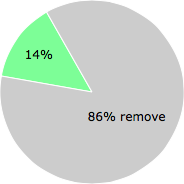
NOTE: Please do not use this poll as the only source of input to determine what you will do with zwangi.exe.
Malware or legitimate?
If you feel that you need more information to determine if your should keep this file or remove it, please read this guide.
And now some shameless self promotion ;)
 Hi, my name is Roger Karlsson. I've been running this website since 2006. I want to let you know about the FreeFixer program. FreeFixer is a freeware tool that analyzes your system and let you manually identify unwanted programs. Once you've identified some malware files, FreeFixer is pretty good at removing them. You can download FreeFixer here. It runs on Windows 2000/XP/2003/2008/2016/2019/Vista/7/8/8.1/10. Supports both 32- and 64-bit Windows.
If you have questions, feedback on FreeFixer or the freefixer.com website, need help analyzing FreeFixer's scan result or just want to say hello, please contact me. You can find my email address at the contact page.
Comments
Please share with the other users what you think about this file. What does this file do? Is it legitimate or something that your computer is better without? Do you know how it was installed on your system? Did you install it yourself or did it come bundled with some other software? Is it running smoothly or do you get some error message? Any information that will help to document this file is welcome. Thank you for your contributions.
I'm reading all new comments so don't hesitate to post a question about the file. If I don't have the answer perhaps another user can help you.
Robert Knobel writes
This is a high risk cloaked malware (as detected by Prevx scanner) Our Vista laptop freezes or hangs periodically.
# 30 Jun 2009, 10:54
Don writes
Freefixer.com is the Bomb. You have my vote for the best. My credentials are self designed websites for me and friends since 1999,at least 5 personal web businesses, graduate of IT program tested high score for hardware on A+ (failed software by 3 points,well I can be someones IT nightmare, started hackers path but stopped too time consuming and I'm a Good guy) I do all of my own computer work. That said just verify this testimonial.... I had a resident dormant Free Skype program that could not be deleted or uninstalled since they started in 04 on my system. Hey I changed my mind after fusing with it. I left it alone to time consuming. Next was Free Panda Express Good but I didn't want it, same scenario but after deletion I kept getting a missing file window every time I turned machine on since05. With the Panda file I did not know what was missing for a year,too busy to sit down for non productive hours and I was not buying their software just to remove it!
Bottom Line FREEFIXER was stumbled upon due to my son corrupting the main computer,Bummer. Well like I say I stumble and this has to be my year highlight. Just like I like it QUICK FAST AND THANK YOU very much!
The software went in and IDENTIFIED EVERYTHING out of order on my system, yes I was alittle skeptical and afraid I was going to f--- it up worst.
Well after three years My system boots clean and feels clean.
Thank you FreeFixer Well Satisfied, if you need more Testimonial let me know.
Don
# 13 Jul 2009, 4:21
arturo writes
Zwangi la primera vez que me apareció fué hace mas de 4 o 5 meses mi sistema se volvió muy lento pero no sabía que era y lo mas raro es que aparecía como un complemento de firefox, supuestamente lo busque para desactivarlo pero al primer intento se reinició mi pc y aparecio el nombre diciendo zwangi todo esta bien y traté de buscar información y la forma de eliminarlo pero de momento no encontré nada en la red y el antivirus no lo detectó el sistema falló totalmente así que utilizando pebuilder revisé mi disco lo ubique y manuelmente eliminé todo rastro pero demasiado tarde ya que perdí mucha información por lo que remití los datos a pandalabs, y al menos el antiovirus ya lo detecta y tengo la opción para eliminarlo totalmente, mi consejo si pueden borrarlo haganlo
# 26 Dec 2009, 23:04
Roger Karlsson writes