What is SSScheduler.exe?
SSScheduler.exe is part of McAfee Free Tools and developed by McAfee, Inc. according to the SSScheduler.exe version information.
SSScheduler.exe's description is "McAfee Security Scanner Scheduler"
SSScheduler.exe is digitally signed by McAfee, Inc..
SSScheduler.exe is usually located in the 'C:\Program Files\McAfee Security Scan\1.0.150\' folder.
None of the anti-virus scanners at VirusTotal reports anything malicious about SSScheduler.exe.
If you have additional information about the file, please share it with the FreeFixer users by posting a comment at the bottom of this page.
Vendor and version information [?]
The following is the available information on SSScheduler.exe:
| Property | Value |
|---|---|
| Product name | McAfee Free Tools |
| Company name | McAfee, Inc. |
| File description | McAfee Security Scanner Scheduler |
| Internal name | SSScheduler |
| Original filename | SSScheduler.exe |
| Legal copyright | Copyright © 2008 McAfee, Inc. |
| Product version | 1,0,0,0 |
| File version | 1,0,150,0 |
Here's a screenshot of the file properties when displayed by Windows Explorer:
| Product name | McAfee Free Tools |
| Company name | McAfee, Inc. |
| File description | McAfee Security Scanner Scheduler |
| Internal name | SSScheduler |
| Original filename | SSScheduler.exe |
| Legal copyright | Copyright © 2008 McAfee, Inc. |
| Product version | 1,0,0,0 |
| File version | 1,0,150,0 |
Digital signatures [?]
SSScheduler.exe has a valid digital signature.
| Property | Value |
|---|---|
| Signer name | McAfee, Inc. |
| Certificate issuer name | VeriSign Class 3 Code Signing 2004 CA |
| Certificate serial number | 564a361e168a81a8f3efaada332508e1 |
VirusTotal report
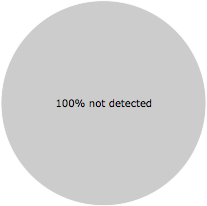
None of the 52 anti-virus programs at VirusTotal detected the SSScheduler.exe file.
Folder name variants
SSScheduler.exe may also be located in other folders than C:\Program Files\McAfee Security Scan\1.0.150\. The most common variants are listed below:
- C:\Archivos de programa\McAfee Security Scan\1.0.150\
- C:\Program Files (x86)\McAfee Security Scan\1.0.150\
- I:\Program Files\McAfee Security Scan\1.0.150\
Hashes [?]
| Property | Value |
|---|---|
| MD5 | d3d8d4095ac70c95020f052d27fa35e4 |
| SHA256 | 313e8da4e5ff8d3abb3f2d65127b39e07111549e4c07afa044b53f8ca5db41d4 |
Error Messages
These are some of the error messages that can appear related to ssscheduler.exe:
ssscheduler.exe has encountered a problem and needs to close. We are sorry for the inconvenience.
ssscheduler.exe - Application Error. The instruction at "0xXXXXXXXX" referenced memory at "0xXXXXXXXX". The memory could not be "read/written". Click on OK to terminate the program.
McAfee Security Scanner Scheduler has stopped working.
End Program - ssscheduler.exe. This program is not responding.
ssscheduler.exe is not a valid Win32 application.
ssscheduler.exe - Application Error. The application failed to initialize properly (0xXXXXXXXX). Click OK to terminate the application.
What will you do with the file?
To help other users, please let us know what you will do with the file:
What did other users do?
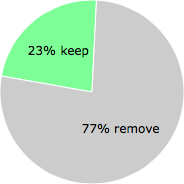
The poll result listed below shows what users chose to do with the file. 77% have voted for removal. Based on votes from 741 users.
NOTE: Please do not use this poll as the only source of input to determine what you will do with the file.
Malware or legitimate?
If you feel that you need more information to determine if your should keep this file or remove it, please read this guide.
And now some shameless self promotion ;)
 Hi, my name is Roger Karlsson. I've been running this website since 2006. I want to let you know about the FreeFixer program. FreeFixer is a freeware tool that analyzes your system and let you manually identify unwanted programs. Once you've identified some malware files, FreeFixer is pretty good at removing them. You can download FreeFixer here. It runs on Windows 2000/XP/2003/2008/2016/2019/Vista/7/8/8.1/10. Supports both 32- and 64-bit Windows.
If you have questions, feedback on FreeFixer or the freefixer.com website, need help analyzing FreeFixer's scan result or just want to say hello, please contact me. You can find my email address at the contact page.
Comments
Please share with the other users what you think about this file. What does this file do? Is it legitimate or something that your computer is better without? Do you know how it was installed on your system? Did you install it yourself or did it come bundled with some other software? Is it running smoothly or do you get some error message? Any information that will help to document this file is welcome. Thank you for your contributions.
I'm reading all new comments so don't hesitate to post a question about the file. If I don't have the answer perhaps another user can help you.
Max writes
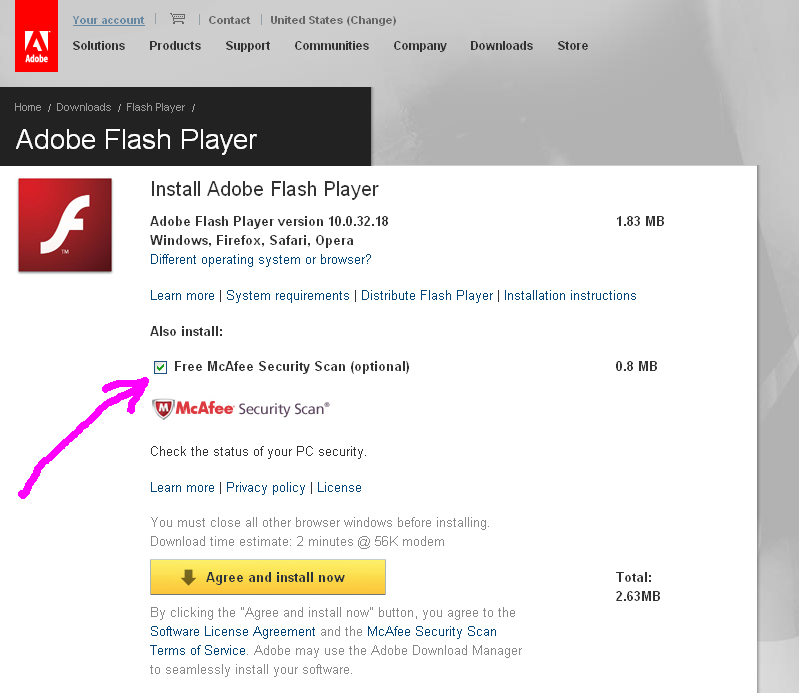
This thing near forcibly installed while I updated my flash player.
What it does it runs a program on windows boot and when you open it, if you dont have an antivirus or firewall program running it shows a warning and tells you to install some McAfee stuff.
Useless, no point keeping it on your PC. Good thing it comes with an uninstaller
# 19 Oct 2009, 7:18

Trevor G writes
This was installed when updating Adobe Flash via Firefox. I find it disgusting that it was installed without my knowledge and permission, and that it is eating system resources...
In my opinion it is spyware, as it is waiting to see if you have a certain software or not, and if it doesn't will then tell you to buy from McAfee.
Another reason to use Avast.
# 11 Nov 2009, 7:06
PE spa writes
Agree totally with the Trevor. Disgusting policy of McAfee/Adobe.
Almost nobody reads license with the belief that such thing as a Flash player won't be made to have any undesired and unwanted behaviour. What will be next? Commercials in Windows Start menu?
# 22 Nov 2009, 22:54
+chris+ writes
I call bull on this ssscheduler, and McAfee period.. My daughters machne was infected with it. I or she never installed McAfee period.. When I tried to open up my anti virus program AVG, it would just block it. Not only that any type of scan I tried to use it would just not let me.. It would automatically open itself up and start scanning.. I had to go into safe mode and run the regit, as I was not able to do it via windows desktop.. Like I said every program I try ot open via desktop would be blocked by this McAfee Security too.. Once I got some of it removed via regeit, under safe mode command prompt, I'm still in the process of trying to remove the rest of the program, but am having a hard time.. When I'm done it will be gone, and plane of contacting McAfee in the morning about this crap..
# 30 Dec 2009, 19:32
+chris+ writes
I tried your freefixer program. I find it funny how it list all legit programs, and the option to delete them. But it list McAfee Security Program and that ssscheduler, and I do not have the option to remove it ?????????
# 30 Dec 2009, 19:41
Logan writes
I uninstalled because I have AVG. You don't want more than 1 anti-virus nor should you have extra running in the background.
# 16 Mar 2010, 3:26
+ Fred + writes
its basically malware designed to make people buy antivirus crap. I didnt download it intentionally, it was attached to a flash update, thus, it was not downloaded willfully and is considered spyware/malware
# 4 Apr 2010, 22:27
+ Fred + writes
and note: use a real uninstaller to remove the SSSccheduler.exe. mcafee likes to hide registry entries and other little goodies on your pc. I suggest Revo uninstaller for the best results
# 4 Apr 2010, 22:34
=Bill= writes
It may not be "malicious" but I'm concerned about the resources it may be consuming. I find it rather hypocritical that a company dedicated to PC security would sneak an executable onto my system.
# 6 May 2010, 20:13
jason M writes
I found an easy way to delete it , just open it as notepad (right click open with notepad)then
erase all the writing on it.
then save it and try to delete it then.
no uninstallers needed.
# 27 May 2010, 23:54
/Sammy/ writes
Found it too @ ugly hostel w-net problems :-O
In ease-2-use CCleaner tool under Extras > Autostart you can disable autoloading.
under named file path, i found an uninstaller exe for MCa**** commercial shi....
# 28 Oct 2010, 16:34
Jeff Perry writes
NIce info. I'm new at this stuff but agree, I don't like anyone piggy backing unwanted stuff and then not leaving a complete removal tool. I went into program files and could not remove SSScheduler:exe. access is denied (Mcafee Security Scanner Scheduler) but was able to remove all the other - my system restore won't work - anyone have a solution
# 26 Dec 2010, 18:25
John Knotabuc writes
Until recently I was an Assistive Technology consultant for the NC Dept of Services for the Blind McAfee is the most incompatible antivirus program with assistive programs for the visually impaired that I have ever encountered. In one case, I was unable to ZoomText screen magnification program at all due to McAfee. Neither I or the top Tech Rep at AI Squared(the makers of ZoomText) were able to find a solution. That is, other than having to download a removal program from MaCafee's web site, because if you just use the Windows 7 add/remove, it's really not gone. Now when you do a download from Adobe there is the opt out check box for McAfee, but it's deceptive, so most users would end up downloading it anyway. At worst, a program that piggy backs in uninvited on another download, takes control of your registry, and needs other software to be removed is a Trojan. And, McAfee at best, is a security tool virus, because it's going to, at some point, try to scare you into buying a full version. I was checking my start up programs today, and guess what I found? 'C:\Program Files\McAfee Security Scan\1.0.150\' Imagine that?
# 6 Apr 2011, 11:20
mayur writes
mcfee ssscheduler has becom a headche fr me nw.....plzzz help me find solution to remove this ssscheduler file....
# 31 Dec 2011, 23:43
shahin writes
Hi,
I am very new into this community , got a problem:
when I do open my laptop it shows a sign --- "acrobat reader could not open SSScheduler.exe because it is either not a supported file type or file has been damaged" ---------- what I am supposed to do exactly to avoid this sign.
shahin
shahjalalbank@gmail.com
# 18 Jun 2012, 3:21
Elizabeth A. Brazeau writes
My Microsoft 207 Word is not working right I'm getting these square boxes and other symbols. And is pointing back to my McAFee anti viruses. It has a box that said: File Coversion-wordicon.exe. Please fix this for me.
# 2 Jan 2013, 13:10
tracysnead writes
I have explored the website <a href="https://casinohex.org/canada/casinos/prepaid-cards/">https://casinohex.org/canada/casinos/prepaid-cards/</a> and I must say, it's a valuable resource for Canadian players seeking online casinos that accept prepaid cards. The site provides a comprehensive list of reputable casinos that support this payment method, offering players a convenient and secure way to fund their gaming accounts. Prepaid cards provide an added layer of privacy and control over spending, making them an excellent choice for those who prefer not to share their banking information. With the information provided on this site, Canadian players can easily find prepaid card-friendly casinos and enjoy a seamless and worry-free gambling experience.
# 17 Dec 2023, 9:34
Roger Karlsson writes