What is AdobeARM.exe?
AdobeARM.exe is part of Adobe Reader and Acrobat Manager and developed by Adobe Systems Incorporated according to the AdobeARM.exe version information.
AdobeARM.exe's description is "Adobe Reader and Acrobat Manager"
AdobeARM.exe is digitally signed by Adobe Systems, Incorporated.
AdobeARM.exe is usually located in the 'C:\Program Files\Common Files\Adobe\ARM\1.0\' folder.
None of the anti-virus scanners at VirusTotal reports anything malicious about AdobeARM.exe.
If you have additional information about the file, please share it with the FreeFixer users by posting a comment at the bottom of this page.
Vendor and version information [?]
The following is the available information on AdobeARM.exe:
| Property | Value |
|---|---|
| Product name | Adobe Reader and Acrobat Manager |
| Company name | Adobe Systems Incorporated |
| File description | Adobe Reader and Acrobat Manager |
| Internal name | AdobeARM.exe |
| Original filename | AdobeARM.exe |
| Legal copyright | Copyright © 2009 Adobe Systems Incorporated. All rights reserved. |
| Product version | 1.0.5.0 |
| File version | 1.0.5.0 |
Here's a screenshot of the file properties when displayed by Windows Explorer:
| Product name | Adobe Reader and Acrobat Manager |
| Company name | Adobe Systems Incorporated |
| File description | Adobe Reader and Acrobat Manager |
| Internal name | AdobeARM.exe |
| Original filename | AdobeARM.exe |
| Legal copyright | Copyright © 2009 Adobe Systems Inco.. |
| Product version | 1.0.5.0 |
| File version | 1.0.5.0 |
Digital signatures [?]
AdobeARM.exe has a valid digital signature.
| Property | Value |
|---|---|
| Signer name | Adobe Systems, Incorporated |
| Certificate issuer name | VeriSign Class 3 Code Signing 2004 CA |
| Certificate serial number | 270d755c9f5ac3b7db61f50998287078 |
VirusTotal report
None of the 47 anti-virus programs at VirusTotal detected the AdobeARM.exe file.
Folder name variants
AdobeARM.exe may also be located in other folders than C:\Program Files\Common Files\Adobe\ARM\1.0\. The most common variants are listed below:
- C:\Program Files (x86)\Common Files\Adobe\ARM\1.0\
- C:\Archivos de programa\Archivos comunes\Adobe\ARM\1.0\
- C:\Arquivos de programas\Arquivos comuns\Adobe\ARM\1.0\
- C:\Program Files\Fichiers communs\Adobe\ARM\1.0\
Hashes [?]
| Property | Value |
|---|---|
| MD5 | 3103fe27c967675b019e880aa6da3d6d |
| SHA256 | 515e750acd28c3cfd8174b7f213e2aa741d8942fb68e57f701ebcbb92ec3f537 |
Error Messages
These are some of the error messages that can appear related to adobearm.exe:
adobearm.exe has encountered a problem and needs to close. We are sorry for the inconvenience.
adobearm.exe - Application Error. The instruction at "0xXXXXXXXX" referenced memory at "0xXXXXXXXX". The memory could not be "read/written". Click on OK to terminate the program.
Adobe Reader and Acrobat Manager has stopped working.
End Program - adobearm.exe. This program is not responding.
adobearm.exe is not a valid Win32 application.
adobearm.exe - Application Error. The application failed to initialize properly (0xXXXXXXXX). Click OK to terminate the application.
What will you do with AdobeARM.exe?
To help other users, please let us know what you will do with AdobeARM.exe:
What did other users do?
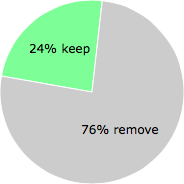
The poll result listed below shows what users chose to do with AdobeARM.exe. 76% have voted for removal. Based on votes from 2141 users.
NOTE: Please do not use this poll as the only source of input to determine what you will do with AdobeARM.exe.
Malware or legitimate?
If you feel that you need more information to determine if your should keep this file or remove it, please read this guide.
And now some shameless self promotion ;)
 Hi, my name is Roger Karlsson. I've been running this website since 2006. I want to let you know about the FreeFixer program. FreeFixer is a freeware tool that analyzes your system and let you manually identify unwanted programs. Once you've identified some malware files, FreeFixer is pretty good at removing them. You can download FreeFixer here. It runs on Windows 2000/XP/2003/2008/2016/2019/Vista/7/8/8.1/10. Supports both 32- and 64-bit Windows.
If you have questions, feedback on FreeFixer or the freefixer.com website, need help analyzing FreeFixer's scan result or just want to say hello, please contact me. You can find my email address at the contact page.
Comments
Please share with the other users what you think about this file. What does this file do? Is it legitimate or something that your computer is better without? Do you know how it was installed on your system? Did you install it yourself or did it come bundled with some other software? Is it running smoothly or do you get some error message? Any information that will help to document this file is welcome. Thank you for your contributions.
I'm reading all new comments so don't hesitate to post a question about the file. If I don't have the answer perhaps another user can help you.
"The Adobe Reader and Acrobat 9.2 and 8.1.7 updates will include a new update and deployment tool, initially shipping in a passive, beta state, which will be functional for Acrobat and Adobe Reader customers in the near future, as well as two new changes in security user interface and control. More information on this is available here <http://blogs.adobe.com/adobereader/>"
# 18 Oct 2009, 18:36
Chris G writes
I'm trying to also find out information about AdobeArm.exe - you're right about there being very little about the program. I've disabled it for now in msconfig. I've got the preferences set to do not download updates so hopefully it should be ok.
# 12 Nov 2009, 11:48
amos writes
AdobeArb connects to the internet on startup and leaves a log file in your temp file folder : adobearm.log
# 6 Dec 2009, 9:33
Jopower writes
Every time I access a PDF the AdobeARM is detected by my firewall, ZoneAlarm. I always deny the outgoing connection attempt. From similar responses to opening other media files in common progs like Media Player, et al, I suspect it is akin to a tracking, permission or copyright check of the file. This is becoming the norm of recent for accessing almost anything with a high profile media prog. I do note there is no problem viewing the file after denial, unlike some of the above inferred progs (ahem!). And thanks to ZoneAlarm for the instant headzup and choice (unlike Windows OEM firewall).
# 26 Jan 2010, 3:48
John Banias writes
i found it in the event viewer as an application error event 1000. it happened after a game i was playing called Galapago. faulting module adobearm.exe, version1.1.5.0 f address 0x00058a81
# 12 Apr 2010, 1:15
Still Closer writes
Different file size : 952768
MD5: DB1DB28467111A24664933AB8908CBCE
Path: C:\Program Files\Common Files\Adobe\ARM\1.0\AdobeARM.exe
Acrobat Reader Version 9.3.2
# 12 May 2010, 11:41
lina torres writes
como quitar el adobearm.exe de mi pc no aparece en archivos de programa y lo booro del adminitrador de tareas y me sige apareciendo
# 11 Nov 2010, 9:23
John Taylor writes
My computer is accessed by a remote start up at ad-hoc times. On looking at OBDC I can see that AdobeARM.log is the culprit lodging in C:\Documents and Settings.
Does this mean the program has this as a built in capability or is it a vehicle being used by other unseen malware.
All my various security scans come up clean and I use CCleaner regularly.
Any advice would be appreciated as my inclination is to expunge Adobe completely from the registry.
# 10 Mar 2011, 0:11
Jim S writes
My AdobeARM.exe triggers an alert from Kaspersky Internet Security v11.0.1.400, stating that AdobeARM.exe is trying to access restricted passwords on my system. This happens every time I use a non-Adobe product, PDF Converter Professional v4.2 from Nuance Communications, to convert a webpage in my Mozilla Firefox browser v11.0 into a PDF file to save that webpage on my hard drive. It bothers me that this file always wants to access restricted passwords on my system. Does anyone know if restricted passwords are a necessity for AdobeARM.exe to do its thing? I don't have any bootup password on my system or on my Adobe Acrobat Reader v10.1.3, so I can't fathom why AdobeARM.exe would need to do that. Practically the only passwords I can think of on my system are a few documents that are password protected. What gives?
# 2 May 2012, 8:58
michael clyde writes
if you disable arm in services it won't bother you anymore ... stop a/updates also, windows and adobe (all)
# 1 Feb 2015, 2:56
Wiliam Mooney writes
AdobeARM.exe intrudes onscreen telling me there is no disc in the drive. Please insert a disc in drive G. this will not cancel or clear from the screen and stops my use of programs. how do I clear it as it is nuisance and limits my use of my computer
# 13 Nov 2015, 2:31
Duncan writes