What is photo_id.exe?
photo_id.exe is usually located in the 'c:\WINDOWS\system32\' folder.
If you have additional information about the file, please share it with the FreeFixer users by posting a comment at the bottom of this page.
Digital signatures [?]
photo_id.exe is not signed.
Hashes [?]
| Property | Value |
|---|---|
| MD5 | fbc681b8244ba5e3fbd9633a8b6da41a |
| SHA256 | e6cdc53dfc6a9d96be545ac71b463b37c416b50171540852ca3f3f82f596ec9b |
Error Messages
These are some of the error messages that can appear related to photo_id.exe:
photo_id.exe has encountered a problem and needs to close. We are sorry for the inconvenience.
photo_id.exe - Application Error. The instruction at "0xXXXXXXXX" referenced memory at "0xXXXXXXXX". The memory could not be "read/written". Click on OK to terminate the program.
photo_id.exe has stopped working.
End Program - photo_id.exe. This program is not responding.
photo_id.exe is not a valid Win32 application.
photo_id.exe - Application Error. The application failed to initialize properly (0xXXXXXXXX). Click OK to terminate the application.
What will you do with photo_id.exe?
To help other users, please let us know what you will do with photo_id.exe:
What did other users do?
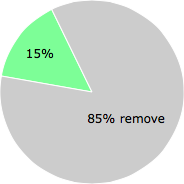
The poll result listed below shows what users chose to do with photo_id.exe. 85% have voted for removal. Based on votes from 39 users.
NOTE: Please do not use this poll as the only source of input to determine what you will do with photo_id.exe.
Malware or legitimate?
If you feel that you need more information to determine if your should keep this file or remove it, please read this guide.
And now some shameless self promotion ;)
 Hi, my name is Roger Karlsson. I've been running this website since 2006. I want to let you know about the FreeFixer program. FreeFixer is a freeware tool that analyzes your system and let you manually identify unwanted programs. Once you've identified some malware files, FreeFixer is pretty good at removing them. You can download FreeFixer here. It runs on Windows 2000/XP/2003/2008/2016/2019/Vista/7/8/8.1/10. Supports both 32- and 64-bit Windows.
If you have questions, feedback on FreeFixer or the freefixer.com website, need help analyzing FreeFixer's scan result or just want to say hello, please contact me. You can find my email address at the contact page.
Comments
Please share with the other users what you think about this file. What does this file do? Is it legitimate or something that your computer is better without? Do you know how it was installed on your system? Did you install it yourself or did it come bundled with some other software? Is it running smoothly or do you get some error message? Any information that will help to document this file is welcome. Thank you for your contributions.
I'm reading all new comments so don't hesitate to post a question about the file. If I don't have the answer perhaps another user can help you.
curryking9 writes
I had been affected by this ****ING VIRUS after i visit a website. I can only said until here and here is my advise: DO ONLY VISIT FAMOUS, BIG WEBSITE since other website might been "trojaned" by this EVIL. i had visit it using golgle chrome and my lappy is just simply been affected.
What i found out about this virus was: that is not only photo_id.exe alone exist, but also algqeh32.exe as well. This virus is "advanced" enough that it make themself bundle under the svchost.exe so even the process explorer also cannot kill the porocess completely. I just try to eliminate both virus in once with regedit.exe and process explorer BUT end up getting BSOD! Even the safe mode also cannot loggin! The only step i can only do is plug out my lappy HDD and move all imortant file to another HDD before reformat it. PLEASE BE COUNTION!!!
# 28 Nov 2009, 7:38
bozo writes
I had been also infected by this. Curryking9 was right, there are two files, the 'photo_id.exe' and the 'algqeh32.exe'. I could get over on it, but my system is still not clean.
What have i did:
1. run msconfig from command line (booted with the virus)
2. set to safe mode / and click out the the algqeh32.exe, not to load it, when reboot
3. Then reboot into safe mode
4. Then delete all 'photo_id.exe' and 'algqeh32.exe' entries from registry
5. Make sure to delete it from Msconfig/Startup
6. Delete all photo_id.exe, and algqeh32.exe from my hard drive (found in Windows/system32;Windows/System32/config;Doc and Settings/User;Doc and Settings/User/StartMenu/startup)
7. There is a library in windows/pass contains boot.ini, win.ini - copied by the virus
8. I put an exe into the Settings/User/StartMenu/startup menu - I have renamed another program, which loads something else.
9. and then reboot
10. Now, my system is working, no svchost.exe is eating my resources, so I could put all my data safe, but the other program is loading on booting, so something is still there.
# 30 Nov 2009, 16:03
Pebo writes
I was infected to, I used Combofix to fix it, but beware it is powerfull. Seems to have killed them all, but there are some strange files connected to the virus, so be alert.
# 1 Dec 2009, 0:48
bozo writes
I do not know, how have I been infected, it comes through one of the visited web page. But I have not deleted all the files, so I can send you the 'algqeh32.exe' (i renamed to algqeh32.ex), if you are still interested in.
# 1 Dec 2009, 7:29
Roger Karlsson writes