What is algqeh32.exe?
algqeh32.exe is usually located in the 'C:\Documents and Settings\Simon\Start Menu\Programs\Startup\' folder.
If you have additional information about the file, please share it with the FreeFixer users by posting a comment at the bottom of this page.
Digital signatures [?]
algqeh32.exe is not signed.
Folder name variants
algqeh32.exe may also be located in other folders than C:\Documents and Settings\Simon\Start Menu\Programs\Startup\. The most common variants are listed below:
- C:\Documents and Settings\Transit\Start Menu\Programs\Startup\
Hashes [?]
| Property | Value |
|---|---|
| MD5 | 6589ea88efc223da9721e3da672600ab |
| SHA256 | 68d9676085bab8ce89fe2ffad805798ec7f06b450227688037204bc708a712fe |
Error Messages
These are some of the error messages that can appear related to algqeh32.exe:
algqeh32.exe has encountered a problem and needs to close. We are sorry for the inconvenience.
algqeh32.exe - Application Error. The instruction at "0xXXXXXXXX" referenced memory at "0xXXXXXXXX". The memory could not be "read/written". Click on OK to terminate the program.
algqeh32.exe has stopped working.
End Program - algqeh32.exe. This program is not responding.
algqeh32.exe is not a valid Win32 application.
algqeh32.exe - Application Error. The application failed to initialize properly (0xXXXXXXXX). Click OK to terminate the application.
What will you do with algqeh32.exe?
To help other users, please let us know what you will do with algqeh32.exe:
What did other users do?
The poll result listed below shows what users chose to do with algqeh32.exe. 89% have voted for removal. Based on votes from 74 users.
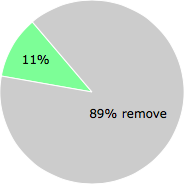
NOTE: Please do not use this poll as the only source of input to determine what you will do with algqeh32.exe.
Malware or legitimate?
If you feel that you need more information to determine if your should keep this file or remove it, please read this guide.
And now some shameless self promotion ;)
 Hi, my name is Roger Karlsson. I've been running this website since 2006. I want to let you know about the FreeFixer program. FreeFixer is a freeware tool that analyzes your system and let you manually identify unwanted programs. Once you've identified some malware files, FreeFixer is pretty good at removing them. You can download FreeFixer here. It runs on Windows 2000/XP/2003/2008/2016/2019/Vista/7/8/8.1/10. Supports both 32- and 64-bit Windows.
If you have questions, feedback on FreeFixer or the freefixer.com website, need help analyzing FreeFixer's scan result or just want to say hello, please contact me. You can find my email address at the contact page.
Comments
Please share with the other users what you think about this file. What does this file do? Is it legitimate or something that your computer is better without? Do you know how it was installed on your system? Did you install it yourself or did it come bundled with some other software? Is it running smoothly or do you get some error message? Any information that will help to document this file is welcome. Thank you for your contributions.
I'm reading all new comments so don't hesitate to post a question about the file. If I don't have the answer perhaps another user can help you.
I found this one together with photo_id.exe on a laptop the last days. CPU run at 100%, as soon as internet connection was established. Anti-Virus didnt remove it, only photo_id.exe was removed, so I had to figure out how to remove the algqeh32.exe. I took the hdd out of the laptop and connected it via usb-adapter to antother maschine, browsed to the autostart folder and deleted the file there - just to be absolutely sure, i put a new empty file there with the same name and made it write protected.
I also removed the algqeh32.exe from the c:\windows\pss folder, as it was placed there as a backup while trying to remove it with msconfig.
I have no idea yet what this tool is trying to do, but the user of the laptop told me, he got aware of the 100% cpu problem - and his mailproxy told him that his machine started to send out spam to the world - so it is kind of a a spam relay, I can assume. Any other ideas?
# 2 Dec 2009, 0:15
==mario== writes
my computer contracted the virus(I dont know how), on november 28th.it was running thruogh svchost.exe,makeing your pc use about 50% of its cpu usage,slowing your computer down quite a bit.i found it in my cc cleaner under startups and tryed disableing it on start up,though i couldnt bc it was in use.so i closed svchost.exe quickly and before my system automatically shut down i deleted the virus in the folder it was hideing,cc cleaner told me exactly where it was,hopefully this helps you in finding more info on it.you can also stop it from running temporarily until startup if you dont know where it is by useing a program named "process explorer", it will show you the processes that svchost is running,though it directly uses svchost.exe in my case. I just killed the thread it was useing,hosted by a server "leaseweb", killing the kernel32.dll stops the virus from communicateing with its owner until start up unless u have of course deleted it manually,without a virus program
# 2 Dec 2009, 0:26
Chris K writes
add to marios tip: if you kill the svchost.exe and the "computer is beeing shutdown in 60 seconds"-window appears - you can quickly open your clock settings by double-clicking the lower right corner of the taskbar - and revert the month by 1 - so set it one month back - that will give you a lot more time before the system shuts down and you can try cleaning it the way mario describes it.
50% cpu usage happens on dual-core machine cause it only uses one cpu core with one thread - the quad core people will only notice about 25 % cpu usage total...
the svchost.exe was also used on my friends machine...
# 2 Dec 2009, 0:32
==mario== writes
yeah, hopefully a virus program catches it soon,I use nod32 myself and tryed a bunch of spyware/malware programs,but none detected it
# 2 Dec 2009, 0:35
:Bob: writes
I have a slightly different problem so could be a variant of algqeh32.exe.
As above I discovered it in the list of startup problems so I checked online and followed to its presumed locations. Nothing! Did a search for it and it came up as a prefetch file which i tried to delete without success. Subsequent searches could not find any reference to the file, strange!
Went into the registry and did a search for algqeh32. Quite a lot of references so deleted them all, subsequent reboots have confirmed these files were deleted from the registry however it still turns up under startup programs.
Have tried deleting all prefetch files, cleaning cache, run Malwarebites Anti-Malware, Spybot seek and destroy, NOD32 scans, Hijackthis fix and still it turns up. No idea where its coming from.
Please post if you have any other ideas.
# 3 Dec 2009, 17:02
Chris K writes
Hey,
As said above, I thought I got it removed, but it came back. Luckily since two days Kaspersky is able to detect it and fully remove it. So I don't know how to do that manually, as Kaspersky was quite busy including two reboots to get rid of this. Oh and they described it as a trojan, so while it is active the guys controlling it can actually do, execute or send what ever they want with and from your machine....
# 4 Dec 2009, 0:16
Chris K writes
Hows it got on my machine? Well, I have to admit that I had not the latest adobe flash version installed, while I was browsing with Firefox on some homebrew scene websites. And I had a different antivirus software without any kind of internet security engine (which I always thought are not necessary for professionals)...
Actually, I now scanned my machine for needed patches and vulnerabilies and had to install a lot of updates for all kind of things - flash, image viewing etc...
And the new suite I installed already detected malware in this and that flash popup - and even in some jpg images loaded in an empty frame and so on...
I am confident I got it while surfing the web, not by installing any software - as I did not install or download anything the days when I got the malware..
How is it with the other?
# 5 Dec 2009, 2:34
:Bob: writes
Hi guys,
I've managed to remove the trojan. It seems that it was blocking part of my Malwarebytes installation. To install Malwarebytes properly follow this guide as some malware blocks the user from installing it correctly http://forums.majorgeeks.com/showthread.php?t=154672
Make sure Malwarebytes is up to date then run a quick scan. When the results come through you should see the algqeh32.exe file flagged up as a trojan. Choose remove selected items but hold off on the restart just now. I ran CCleaner (http://www.ccleaner.com/download) to delete all windows prefetch data (make sure this option is ticked) then ran msconfig and under startup unchecked algqeh32.exe, applied the changes and chose exit without restart, then hit the restart now button on Malwarebytes.
On restart I checked MSconfig and algqeh32.exe was now unchecked as a startup program. Followed this guide to use regedit to delete the msconfig reference to the file http://www.kellys-korner-xp.com/xp_msconfig.htm.
Computer seems to be clean now. If its not worked for you follow the procedure I laid out in an earlier post here to delete the references in the registry.
Hope this helps
# 8 Dec 2009, 4:38
curryking9 writes
Well, i am 1 of the victim under the algqeh32.exe.
My lappy is infected by this virus by surfing a website ---"www.torrentreactor.com" DO NOT OPEN IT UNLESS YOU HAD PREPARED OR WANT TO TEST THE CAPABILITY OF YOUR AV/SECURITY SOFTWARE. That time i am using google chrome and it freezed for 1 minutes after opening the website n something goes wrong. Avira can only delete some virus related file BUT cannot BLOCK the website from DOWNLOADING & AUTOMATIC INSTALL the virus in my lappy. Than the later is just like i had described in my previous post. I wonder whether the TORRENT REACTOR had "updated" their trojan yet for now cause the virus was just so "fresh" that only a few website had described the virus existence when my lappy was infected.
# 2 Jan 2010, 3:00
Chris K writes