What is pev.rkexe?
pev.rkexe is usually located in the 'c:\Documents and Settings\IBM\Local Settings\temp\8.tmp\' folder.
Some of the anti-virus scanners at VirusTotal detected pev.rkexe.
If you have additional information about the file, please share it with the FreeFixer users by posting a comment at the bottom of this page.
Digital signatures [?]
pev.rkexe is not signed.
VirusTotal report
2 of the 51 anti-virus programs at VirusTotal detected the pev.rkexe file. That's a 4% detection rate.
| Scanner | Detection Name |
|---|---|
| Agnitum | Packed/PECompact |
| Bkav | HW32.CDB.F5eb |

pev.rkexe removal instructions
The instructions below shows how to remove pev.rkexe with help from the FreeFixer removal tool. Basically, you install FreeFixer, scan your computer, check the pev.rkexe file for removal, restart your computer and scan it again to verify that pev.rkexe has been successfully removed. Here are the removal instructions in more detail:
- Download and install FreeFixer: http://www.freefixer.com/download.html
- Start FreeFixer and press the Start Scan button. The scan will finish in approximately five minutes.
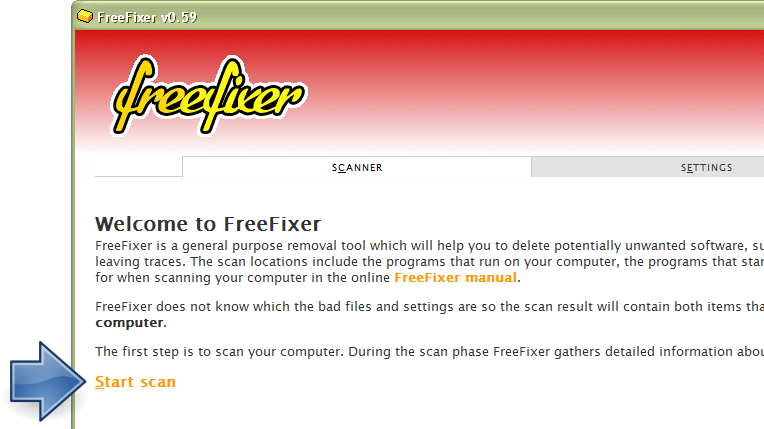
- When the scan is finished, locate pev.rkexe in the scan result and tick the checkbox next to the pev.rkexe file. Do not check any other file for removal unless you are 100% sure you want to delete it. Tip: Press CTRL-F to open up FreeFixer's search dialog to quickly locate pev.rkexe in the scan result.



 c:\Documents and Settings\IBM\Local Settings\temp\8.tmp\pev.rkexe
- Scroll down to the bottom of the scan result and press the Fix button. FreeFixer will now delete the pev.rkexe file.

- Restart your computer.
- Start FreeFixer and scan your computer again. If pev.rkexe still remains in the scan result, proceed with the next step. If pev.rkexe is gone from the scan result you're done.
- If pev.rkexe still remains in the scan result, check its checkbox again in the scan result and click Fix.
- Restart your computer.
- Start FreeFixer and scan your computer again. Verify that pev.rkexe no longer appear in the scan result.
Filename variants
pev.rkexe may also use other filenames. The most common variants are listed below:
- evP.exe
Folder name variants
pev.rkexe may also be located in other folders than c:\Documents and Settings\IBM\Local Settings\temp\8.tmp\. The most common variants are listed below:
- c:\Documents and Settings\Jacob\Local Settings\Temp\114.tmp\
- c:\Documents and Settings\Justin Morrow\Local Settings\Temp\170.tmp\
- c:\Documents and Settings\Kelly\Local Settings\Temp\17.tmp\
- c:\Documents and Settings\Kelly\Local Settings\Temp\1A.tmp\
- c:\Dokumente und Einstellungen\vedigor\Lokale Einstellungen\temp\28.tmp\
- c:\Users\Bonesaw\AppData\Local\Temp\3D5D.tmp\
- c:\Users\Kiko\AppData\Local\Temp\8371.tmp\
- f:\Documents and Settings\Kelvin\Local Settings\Temp\34.tmp\
Hashes [?]
| Property | Value |
|---|---|
| MD5 | 3b44e6b3653fabdf876bc2b13c434e62 |
| SHA256 | 21793f8b54906ebd1dada5bc350bae8399e49409c889bf6dc6294acb13baf797 |
What will you do with pev.rkexe?
To help other users, please let us know what you will do with pev.rkexe:
What did other users do?
The poll result listed below shows what users chose to do with pev.rkexe. 93% have voted for removal. Based on votes from 14 users.
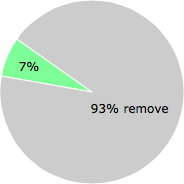
NOTE: Please do not use this poll as the only source of input to determine what you will do with pev.rkexe. Only 14 users has voted so far so it does not offer a high degree of confidence.
Comments
Please share with the other users what you think about this file. What does this file do? Is it legitimate or something that your computer is better without? Do you know how it was installed on your system? Did you install it yourself or did it come bundled with some other software? Is it running smoothly or do you get some error message? Any information that will help to document this file is welcome. Thank you for your contributions.
I'm reading all new comments so don't hesitate to post a question about the file. If I don't have the answer perhaps another user can help you.
I found it in windows prefetch and freefix doesn't have it listed after the scan
# 11 Feb 2012, 10:08
-John- writes