What is wmpscfgs .exe?
wmpscfgs .exe is usually located in the 'c:\program files\internet explorer\' folder.
If you have additional information about the file, please share it with the FreeFixer users by posting a comment at the bottom of this page.
Digital signatures [?]
wmpscfgs .exe is not signed.
Hashes [?]
| Property | Value |
|---|---|
| MD5 | 02c200db57e674f8f73268d48ba7db22 |
| SHA256 | 2989b32bc4f5991f8f4ad3686c947b08875b2bce350272583dd3de9fb48379c4 |
Error Messages
These are some of the error messages that can appear related to wmpscfgs .exe:
wmpscfgs .exe has encountered a problem and needs to close. We are sorry for the inconvenience.
wmpscfgs .exe - Application Error. The instruction at "0xXXXXXXXX" referenced memory at "0xXXXXXXXX". The memory could not be "read/written". Click on OK to terminate the program.
wmpscfgs .exe has stopped working.
End Program - wmpscfgs .exe. This program is not responding.
wmpscfgs .exe is not a valid Win32 application.
wmpscfgs .exe - Application Error. The application failed to initialize properly (0xXXXXXXXX). Click OK to terminate the application.
What will you do with wmpscfgs .exe?
To help other users, please let us know what you will do with wmpscfgs .exe:
What did other users do?
The poll result listed below shows what users chose to do with wmpscfgs .exe. 92% have voted for removal. Based on votes from 241 users.
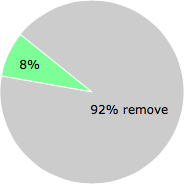
NOTE: Please do not use this poll as the only source of input to determine what you will do with wmpscfgs .exe.
Malware or legitimate?
If you feel that you need more information to determine if your should keep this file or remove it, please read this guide.
And now some shameless self promotion ;)
 Hi, my name is Roger Karlsson. I've been running this website since 2006. I want to let you know about the FreeFixer program. FreeFixer is a freeware tool that analyzes your system and let you manually identify unwanted programs. Once you've identified some malware files, FreeFixer is pretty good at removing them. You can download FreeFixer here. It runs on Windows 2000/XP/2003/2008/2016/2019/Vista/7/8/8.1/10. Supports both 32- and 64-bit Windows.
If you have questions, feedback on FreeFixer or the freefixer.com website, need help analyzing FreeFixer's scan result or just want to say hello, please contact me. You can find my email address at the contact page.
Comments
Please share with the other users what you think about this file. What does this file do? Is it legitimate or something that your computer is better without? Do you know how it was installed on your system? Did you install it yourself or did it come bundled with some other software? Is it running smoothly or do you get some error message? Any information that will help to document this file is welcome. Thank you for your contributions.
I'm reading all new comments so don't hesitate to post a question about the file. If I don't have the answer perhaps another user can help you.
Bryan C writes
* Boot in safe mode. The reason for this is that in safe mode there is not much processes running. You need this setup in step 9 below as this virus is a nasty one.
* Open up windows explorer and go to Tools -> Folder options .
a. Make sure the following are TICKED -> Show hidden files and folders
b. Make sure the following are UNticked -> Hide Extensions for known file types
* Go to the following directories (this is for vista home premium):
C:\Program Files\Internet Explorer
C:\Users\user\AppData\Local\Temp
And you will see there a file called wmpscfgs.exe. Delete them.
* Open up your task manager, make sure the ’show all processes’ is ticked and look for the same process. If it is running. Kill it.
* Open up regedit and go to: HKLM->Software -> Microsoft -> Windows -> CurrentVersion –> Run
* Look for Adobe_reader entry with data: “%ProgramFiles%\Internet Explorer\wmpscfgs.exe“. Delete it. For me from this point almost all of the things written in the NET currently don’t have the steps below. And its the reason why this virus keeps coming back.
* Hopefully you dont have much applications under “HKLM->Software -> Microsoft -> Windows -> CurrentVersion -> Run”. Because you have to visit each one of them literally because this virus hijacks almost every application in the RUN list above.
* Basically it renames the old exe file from say “mcagent.exe” to “mcagent .exe”. With a space between the filename and the “.exe” or extension. It will then create a copy of itself with the same filename as your executable file so that when someone executes your file, the virus will be executed first then your file. It will do this for every apps you have in your Run list.
Thus if you go to the location of say of McAfee mcagent.exe application you will see two to three files with almost the same filename:
o mcagent.exe -> which is a 39 KB file, and very recently created and which is the virus that keeps adding back that wmpscfgs.exe file.
o mcagent .exe -> the original mcagent file, renamed.
o mcagent.exe.delme<some random number> -> delete this one as well. I don’t see this occurring every time, but i have seen some apps with this file in them and very recently created.
* You first need to kill the corresponding process of the infected file if they are running in task manager, manually remove the existing .exe file which is around 39KB only and rename back your old executable file to its former filename. Repeat this for every application you have in your Run list above. The only thing that i saw this virus didn’t infect was the windows defender application. The rest in my Run list were screwed. Uninstalling and reinstalling them doesn’t help as well as the former Trojan exe file will be retained in the application directory.
This is the reason why Microsoft Security Essentials was complaining that your startup executable files are viruses.
* Once you have verified that each application in your run list has been restored. To be fully sure that you don’t have any such files lingering in your system, do a drive search for any file that has 39KB size and has just been recently created and examine each one carefully if they are just copies of your original executable file. Follow step 7 for each occurrence of it. So far, i only saw this virus attach itself into executable files.
* If you want to be 100% sure, next thing you need to do is double check every process running in your task manager if they are legit. Some process specially those started by system wont be able to take you to its process file, its ok, but most of them if you do a right click in them, you should see an option there called “Open File Location”. Then follow steps 7 above.
* Reboot and that’s it!
# 1 Feb 2010, 0:37
Santiago Shah writes
I tried the Bryan method, but the file refused to be deleted. Also- regedit is also disabled. I am lost. Hopefully freefixer will work. Otherwise I am screwed. Lost the restore disk and the virus deleted all my other restore points. Looks like Win 7 is calling.
Thanks
# 8 Mar 2010, 23:28
James R. Brown writes
This fix worked for me. FYI, registrar lite (highly recommended, http://www.resplendence.com/downloads), will allow you to edit your registry even while infected)
# 7 Apr 2010, 10:33
Mike writes
I don't have the HKLM tab under my regedit. I just have all prefixes of HKEY. I've been to HKEY_LOCAL_MACHINE and HKEY_CURRENT_USER. Only the HKEY_LOCAL_MACHINE contained the run key and it just "(Default)" in there, nothing else to delete. I have windows vista 64-bit. The virus however keeps coming back. Any other options/ideas?
# 26 Apr 2010, 16:02
Roger Karlsson writes