What is srvklw32.exe?
srvklw32.exe is usually located in the 'C:\Documents and Settings\Administrator\Start Menu\Programlar\Başlangıç\' folder.
Some of the anti-virus scanners at VirusTotal detected srvklw32.exe.
If you have additional information about the file, please share it with the FreeFixer users by posting a comment at the bottom of this page.
Digital signatures [?]
srvklw32.exe is not signed.
VirusTotal report
35 of the 42 anti-virus programs at VirusTotal detected the srvklw32.exe file. That's a 83% detection rate.
| Scanner | Detection Name |
|---|---|
| AhnLab-V3 | Win-Trojan/Bredolab.34304.P |
| AntiVir | TR/Jorik.Bredolab.T |
| Avast | Win32:Rootkit-gen [Rtk] |
| AVG | Generic18.ANXY |
| BitDefender | Trojan.Generic.4480756 |
| ClamAV | Trojan.Agent-259870 |
| Commtouch | W32/Trojan2.NDRP |
| Comodo | TrojWare.Win32.Trojan.Agent.Gen |
| DrWeb | Trojan.MulDrop1.39264 |
| Emsisoft | Packed.Win32.Katusha!IK |
| F-Prot | W32/Trojan2.NDRP |
| F-Secure | Trojan-Downloader:W32/Bredolab.YU |
| Fortinet | W32/Jorik_Bredolab.T!tr |
| GData | Trojan.Generic.4480756 |
| Ikarus | Packed.Win32.Katusha |
| Jiangmin | Trojan/Jorik.gt |
| K7AntiVirus | Trojan |
| Kaspersky | Packed.Win32.Katusha.o |
| McAfee | Bredolab!n |
| McAfee-GW-Edition | Bredolab!n |
| Microsoft | Trojan:Win32/Lodap!rts |
| NOD32 | a variant of Win32/Kryptik.FNS |
| Norman | W32/Bredolab.ZY |
| nProtect | Trojan/W32.Small.34304.GV |
| Panda | Trj/CI.A |
| PCTools | Trojan.Gen |
| Rising | Trojan.Win32.Generic.122FFBFB |
| Sophos | Troj/Agent-NXS |
| Symantec | Trojan.Gen |
| TheHacker | Trojan/Jorik.Bredolab.t |
| TrendMicro | TROJ_BREDO.AB |
| TrendMicro-HouseCall | TROJ_BREDO.AB |
| VBA32 | Trojan.Win32.Jorik.Bredolab.t |
| VIPRE | Trojan.Win32.Generic!BT |
| ViRobot | Trojan.Win32.Jorik.34304 |

srvklw32.exe removal instructions
The instructions below shows how to remove srvklw32.exe with help from the FreeFixer removal tool. Basically, you install FreeFixer, scan your computer, check the srvklw32.exe file for removal, restart your computer and scan it again to verify that srvklw32.exe has been successfully removed. Here are the removal instructions in more detail:
- Download and install FreeFixer: http://www.freefixer.com/download.html
- Start FreeFixer and press the Start Scan button. The scan will finish in approximately five minutes.
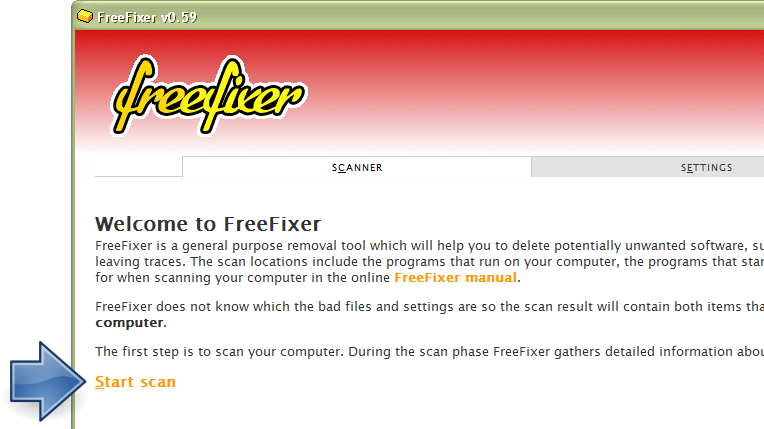
- When the scan is finished, locate srvklw32.exe in the scan result and tick the checkbox next to the srvklw32.exe file. Do not check any other file for removal unless you are 100% sure you want to delete it. Tip: Press CTRL-F to open up FreeFixer's search dialog to quickly locate srvklw32.exe in the scan result.



 C:\Documents and Settings\Admi..\Start Menu\Programlar\Başlangıç\srvklw32.exe
- Scroll down to the bottom of the scan result and press the Fix button. FreeFixer will now delete the srvklw32.exe file.

- Restart your computer.
- Start FreeFixer and scan your computer again. If srvklw32.exe still remains in the scan result, proceed with the next step. If srvklw32.exe is gone from the scan result you're done.
- If srvklw32.exe still remains in the scan result, check its checkbox again in the scan result and click Fix.
- Restart your computer.
- Start FreeFixer and scan your computer again. Verify that srvklw32.exe no longer appear in the scan result.
Folder name variants
srvklw32.exe may also be located in other folders than C:\Documents and Settings\Administrator\Start Menu\Programlar\Başlangıç\. The most common variants are listed below:
- C:\Documents and Settings\O_o\Start Menu\Programlar\Başlangıç\
- C:\Documents and Settings\xp\Start Menu\Programlar\Başlangıç\
Hashes [?]
| Property | Value |
|---|---|
| MD5 | d5e560e866e0e1210a7fcbaff0a115bb |
| SHA256 | b0dd4c8bdcab8e226c3a6165b57483045da651735906471e30193b799b95d370 |
Error Messages
These are some of the error messages that can appear related to srvklw32.exe:
srvklw32.exe has encountered a problem and needs to close. We are sorry for the inconvenience.
srvklw32.exe - Application Error. The instruction at "0xXXXXXXXX" referenced memory at "0xXXXXXXXX". The memory could not be "read/written". Click on OK to terminate the program.
srvklw32.exe has stopped working.
End Program - srvklw32.exe. This program is not responding.
srvklw32.exe is not a valid Win32 application.
srvklw32.exe - Application Error. The application failed to initialize properly (0xXXXXXXXX). Click OK to terminate the application.
What will you do with srvklw32.exe?
To help other users, please let us know what you will do with srvklw32.exe:
What did other users do?
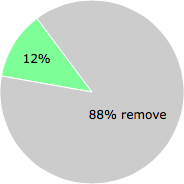
The poll result listed below shows what users chose to do with srvklw32.exe. 88% have voted for removal. Based on votes from 75 users.
NOTE: Please do not use this poll as the only source of input to determine what you will do with srvklw32.exe.
Comments
Please share with the other users what you think about this file. What does this file do? Is it legitimate or something that your computer is better without? Do you know how it was installed on your system? Did you install it yourself or did it come bundled with some other software? Is it running smoothly or do you get some error message? Any information that will help to document this file is welcome. Thank you for your contributions.
I'm reading all new comments so don't hesitate to post a question about the file. If I don't have the answer perhaps another user can help you.
This file has severly affected my google chrome.
it has been behaving very odd . chrome has slowed down
once an address is typed in chrome, the page dosenot load. but the moment u start a new tab, the previous tab starts to load.
i'm not sure whether it is my network problem , but ever since this file appered, my connection is terminating . the modem shows connection has no problem. but i have to literally on and off the modem to get the connection back
# 12 Jul 2010, 10:55
marcao writes
Thanks a lot! You have resolved my problem.
One thing: if we had a computer infected by srvklw32.exe the CPU is near 100% of usage and scanning goes on for 2-3 hours.
Freefixer completely removed this malware from my computer.
# 13 Jul 2010, 8:12
Robert A writes
>Do you how the srvklw32.exe malware got onto your machine?
That's exactly what's bugging me. I considered (past tense) myself a careful user for many years, running Vista with UAC activated + Microsoft Security Essentials. I've stayed away from pirated software since a long time, using available open source software instead. I also am not the type to click on those 'free emoticons for msn' ads. That all said, I discovered my computer still got infected with this srvklw32.exe trojan. Indeed I got triggered by the svchost process that would consume 100% cpu every now and then. That, and MS Sec. Essentials alerted me that TrojanDownload:Win32/Cutwail.BA and PWS:Win32/Daurso.A were found on my machine. After inspecting the CPU-hogging svchost.exe process with process explorer, I found out it had an active connection with a server having an ip (80.77.151.203) related to russian domains that belong to, I believe, the more shady part of the internet. I suspect that the remote server uploaded the other malware to my machine, which MS Sec. Essentials was able to detect.
As far as I can tell, I haven't done anything obviously stupid that would guarantee a trojan to be installed on my machine. The only installers I can remember having given the green light around the same time as my CPU-hogging problem roared its head (9, 10th of july) is an update of Firefox (now running 3.6.6), together with updates of some Firefox add-ons. I'm not sure which one it was. I have AdBlock Plus, Foxyproxy Basic, SyncPlaces and ForecastFox installed, so it must've been one of those. I also updated VirtualBox from 3.2.4 to 3.2.6. Oh yeah, and in the week preceding, I updated Picasa to 3.6.0.
I wanted to check whether I installed something else, a driver or something, and I found out that all my restore points in system restore are gone. Clever malware.
Well hope this helps to shine some light onto the matter. I still am pretty clueless...
# 13 Jul 2010, 9:51
Lyndon writes
I got this virus late on Saturday night (July 9th), and discovered it the following day when I started my PC.
One of the svchost.exe processes was running at 100% CPU, and killing it rebooted my machine. I noticed srvklw32 and a couple of other items in my startup. I tried to clean it up manually, without much success ... even though I found the registry entries. I ended up buying prevx as that was the only software that would cure it at the time.
Check for file c:\windows\system32\drivers\gdbnc.sys. This file remained hanging around on my system, and is also some sort of virus. I couldn't get rid of that file until last night's MS Malicious Software Removal Tool update was applied ... then it was cleaned instantly. I then manually removed the legacy_gdbnc entries in the registry (I searched the registry for gdbnc).
I'm still not convinced my computer is fully cleaned, though. I'll give freefixer a go when I get home.
I got infected by routine internet surfing of perfectly legitimate sites (honestly!!! - LOL). My Avira AV product detected a number of viruses, but this one (being new) slipped through the net.
I hope that's a useful addition to this thread.
# 15 Jul 2010, 3:16
joseph D writes
hey guys, yeah i got the same bug and a couple other ones. i am not sure if they are related. i simply was searching for this movie to watch on google called blue velvet with megavideos and i opened up a site with the words bluevelvet and megavideo.com and all of a sudden a java application started loading with a pdf file. Strange yeah.
# 17 Jul 2010, 9:46
Raj H writes
I had the same issue, svchost.exe was consuming 50% of the memory all the time. At first I thought it was some corrupted software. I tried uninstalling software (Avast Antivirus, Citrix, GTalk) etc one by one, This did not make any difference. Then i tried disable a lot of services in safe mode, this did not work too. This is when i found srvklw32.exe in the Hijack This log. After removing it svchost.exe is normal, but the system is still slow. Sometimes alg.exe crashes on startup or svchost.exe crashes.
Any idea if there is something else left behind. BTW i think this is a pretty scary virus/trojan. Im a safe user and don't usually download any junk, Not sure how this enetered my system. My best guess would be from some Java Applet in a website....
# 18 Jul 2010, 10:40
Lyndon writes
Raj, in answer to your question ... maybe, I'm a bit suspicious of that. Check for this file c:\windows\system32\drivers\gdbnc.sys.
If it's there, the latest update to Microsoft Malicious Software Removal Tool cleared it - I was unable to delete it in safe boot. Oh, I'm running XP SP3.
I'm currently doing regular scans with Avira Antivir, SuperAntiSpyware and Prevx.
# 18 Jul 2010, 16:02
Terry writes
Hi. Thanks for the info.My PC was running at 100% constant.Couldn`t delete the file as it was in use.Scans were taking hours. So removed the hard drive, put it in a caddy and put it on another machine. Now I knew what I was looking for I was able to delete it. Put the drive back in the original machine.Seems to have cleared it. Free fixer took minutes to scan and showed clear.
Thanks for your help.
Regards
# 18 Jul 2010, 22:18
Raj H writes
@Lyndon, Thanks for your reply. I looked in the Windows\System32\Drivers directory and the file is not present. Maybe its time to re-install windows now :(
# 19 Jul 2010, 8:10
travel nurse writes
Ok, now I'm stuck...I deleted based on instructions above. It sees to have completely crashed my system. I can barely open IE and have to do so with add-ons disabled. I cannot open Chrome or Firefox. I did manage to get my Mozilla Thunderbird open and email downloaded. What did I do wrong?? HELP!!
# 20 Jul 2010, 14:03
Lyndon writes
@Raj. I think that file was a one-off ... maybe a specific (random) name for my PC as I cannot see it mentioned elsewhere on the web.
Reinstall Windows? LOL ... great minds think alike, mate. I might just do that myself this weekend ... last reinstall was three and a half years ago, so it wouldn't hurt.
# 22 Jul 2010, 16:08
Robert A writes
>i opened up a site with the words bluevelvet and megavideo.com and all of a sudden a java application started loading with a pdf file
I too remember seeing the java icon pop up on my task bar when I didn't expect it. I was looking for a pdf file, so it might have been one of those pdf search sites that starts a java applet? Not sure which one it was though, and I reinstalled that machine just to be sure.
# 24 Jul 2010, 23:47
y-c writes
Hi,Roger,you are right,is my antvirus app (Trend micro) interferes the scan,when I shut it down,scan is normal,finally I delete the troublesome srvklw32.exe. thanks a lot.
# 27 Jul 2010, 12:02
Abraham writes