AutoDownload.net - 25% Detection Rate *
Did you just stumble upon a download or a file on your computer that has been digitally signed by AutoDownload.net? Some of the security products refers to the detected files as Gen:Variant.Adware.Wajam.1 and Wajam (fs). The detection rate for the AutoDownload.net files collected here is 25%. Please read on for more details.
You will probably see AutoDownload.net when clicking to run the file. The publisher name shows up as the "Verified publisher" in the UAC dialog as the screenshot shows:
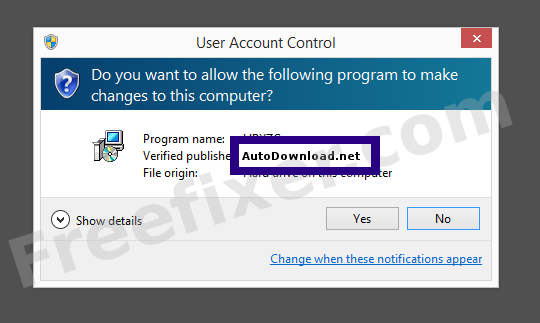
You can view additional details from the AutoDownload.net certificate with the following procedure:
- Open Windows Explorer and locate the AutoDownload.net file
- Right-click the file and select Properties
- Click the Digital Signatures tab
- Click on the View Certificate button
Here's a screengrab of a file digitally signed by AutoDownload.net:
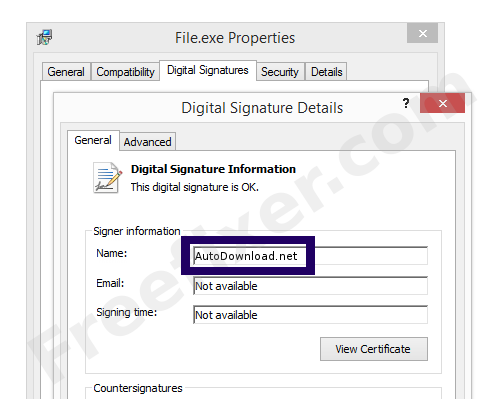
As you can see in the screenshot above, Windows reports that "This digital signature is OK". This means that the file has been published by AutoDownload.net and that no one has tampered with the file.
If you click the View Certificate button shown in the screengrab above, you can examine all the details of the certificate, such as when it was issued, who issued the certificate, how long it is valid, and so on. You can also examine the address for AutoDownload.net, such as the street name, city and country.
COMODO RSA Code Signing CA has issued the AutoDownload.net certificates. You can also examine the details of the issuer by clicking the View Certificate button shown in the screenshot above.
AutoDownload.net Files
The following are the AutoDownload.net files I've collected, thanks to the FreeFixer users.
| Detection Ratio | File Name |
|---|---|
| 25/57 | WWE_1.2.0.53.exe |
| 7/56 | WWE_1.2.0.38[1].exe |
| 10/57 | Au_.exe |
Scanner and Detection Names
Here is the detection names for the AutoDownload.net files. I have grouped the detection names by each scanner engine. Thanks to VirusTotal for the scan results.
| Scanner | Detection Names |
|---|---|
| AVware | Wajam (fs) |
| Ad-Aware | Gen:Variant.Adware.Wajam.1 |
| AhnLab-V3 | Downloader/Win32.Genome |
| Avast | Win64:Malware-gen |
| Avira | Adware/Wajam.1081344, ADWARE/BrowseFox.Gen4 |
| Baidu-International | Adware.Win32.Wajam.81 |
| BitDefender | Gen:Variant.Adware.Wajam.1 |
| DrWeb | Adware.Searcher.2773 |
| ESET-NOD32 | Win32/Wajam.K potentially unwanted |
| Emsisoft | Gen:Variant.Adware.Wajam.1 (B) |
| F-Secure | Gen:Variant.Adware.Wajam |
| Fortinet | Riskware/Wajam |
| GData | Gen:Variant.Adware.Wajam.1 |
| K7AntiVirus | Trojan ( 004b4d9f1 ), Riskware ( 0040eff71 ) |
| K7GW | Trojan ( 004b4d9f1 ), Riskware ( 0040eff71 ) |
| Malwarebytes | PUP.Optional.Wajam.A |
| McAfee | Artemis!0B7F063FEF32, Artemis!96443433889B, Artemis!06CB9EF96946 |
| McAfee-GW-Edition | Artemis |
| MicroWorld-eScan | Gen:Variant.Adware.Wajam.1 |
| NANO-Antivirus | Trojan.Win32.Wajam.dorcye |
| Qihoo-360 | HEUR/QVM42.0.Malware.Gen, HEUR/Malware.QVM06.Gen, Win32/Virus.Adware.650 |
| Sophos | Browse Fox |
| Symantec | Trojan.Gen.2, WS.Reputation.1 |
| TrendMicro-HouseCall | Suspicious_GEN.F47V0304, Suspicious_GEN.F47V1211 |
| VBA32 | suspected of Trojan.Downloader.gen.h |
| VIPRE | Wajam (fs) |
* How the Detection Percentage is Calculated
The detection percentage is based on the fact that I've collected 170 scan reports for the AutoDownload.net files. 42 of these scan reports came up with some sort of detection. If you like, you can view the full details of the scan reports by examining the files listed above.
Analysis Details
The analysis is done on certificates with the following serial numbers:
- 008d26ad64b2384859e0207b356634583d