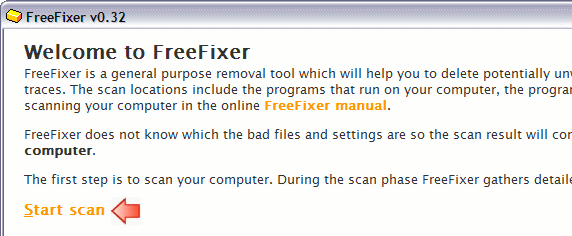
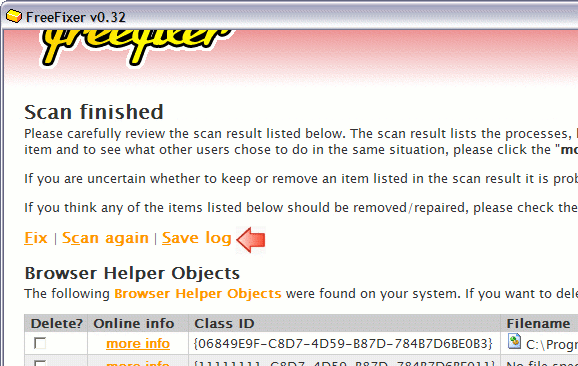
Hello, my name is Roger Karlsson. I'm the programmer of FreeFixer. FreeFixer is a tool for manual identification and removal of spyware, trojans, adware, and other types of unwanted software. FreeFixer works by scanning the programs that run on your computer, the programs that starts when you reboot your computer, your browser's plug-ins, your home page setting, etc. The result of the scan is stored in a log file, which will contain both legitimate files and settings and those that should be removed. Although the FreeFixer program help you by showing what other users did when they found the same file on their computer, it can still be difficult to sort out the good from the bad.
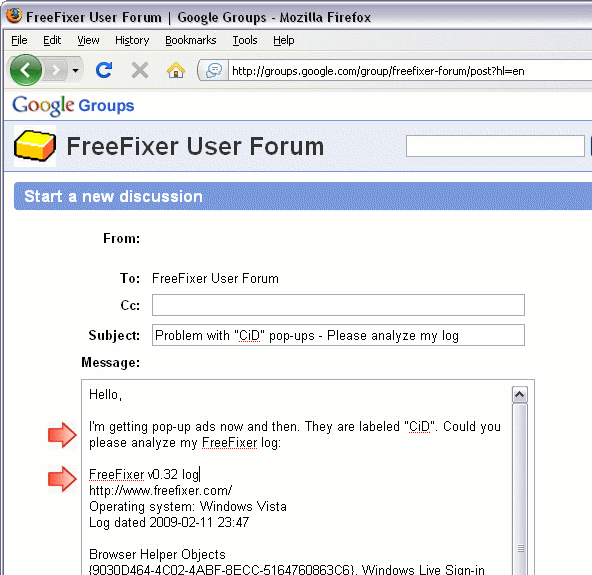
I've set up a discussion group where you can post your FreeFixer log. This is a free service. It will not cost you anything except five minutes of your time. I'll respond as soon as possible. Please go through the following steps to post a log:


I'm getting pop-upsor
My anti-virus detects Trojan.Swizzor, but is unable to delete the infected files. Please open the FreeFixer log and copy and paste it below the problem description.

hello,
i tried to use freefixer and after the reboot i only get c000021a bsd, saying windows logon problem. same happens if i use safe mode or last good configuration. Any top on how to return back to previous situation?
thanks.
# 17 May 2009, 19:20
seems i am meeting a problem running freefixer...i never get the scan finished window...even after 3 hours the process is beiing running..No way to close the program..
I HAVE TO COME TO CTRL ALT SUP; then when i look at the processor job it is running at 100% and i have a "no answer from running process" so i have to stop the process...
Thks for any help
Best regards
# 20 Aug 2009, 21:44
I have tried to put my saved log of what the scan found but for some reason I cannot get past the page that asks to post it. When I click on the link to + new post it tells me that the server cannot be found. Is that part of this stupid IS2010.exe virus. I have also found that I have that stupid Winlogon and all the other ones that have been found on your site. Thos Is a copy of that log
FreeFixer v0.50 log
http://www.freefixer.com/
Operating system: Windows XP Service Pack 3
Log dated 2009-12-26 16:20
AppInit_DLLs
gidohanu.dll (file is missing)
Shell settings
HKLM\..\Winlogon, Shell = Explorer.exe logon.exe
TCP/IP settings
HKLM\..\Interfaces\{49AB9AAD-B22F-4538-8E39-AAEBD8DCCEC8}, NameServer = 193.104.110.38,4.2.2.1,24.151.8.210 24.151.8.211 66.189.130.21
Browser Helper Objects (4 whitelisted)
{02478D38-C3F9-4efb-9B51-7695ECA05670}, , (no file specified)
{E7E6F031-17CE-4C07-BC86-EABFE594F69C}, JQSIEStartDetectorImpl Class, C:\Program Files\Java\jre6\lib\deploy\jqs\ie\jqs_plugin.dll
{FDD3B846-8D59-4ffb-8758-209B6AD74ACC}, , (no file specified)
Internet Explorer toolbars (3 whitelisted)
HKLM\..\Toolbar\ - - (no file specified)
HKLM\..\Toolbar\{B2847E28-5D7D-4DEB-8B67-05D28BCF79F5} - HP View - c:\Program Files\HP\Digital Imaging\bin\hpdtlk02.dll
HKCU\..\Toolbar\ShellBrowser\{A057A204-BACC-4D26-9990-79A187E2698E} - - (no file specified)
HKCU\..\Toolbar\WebBrowser\{42CDD1BF-3FFB-4238-8AD1-7859DF00B1D6} - - (no file specified)
HKCU\..\Toolbar\WebBrowser\{EF99BD32-C1FB-11D2-892F-0090271D4F88} - - (no file specified)
Basic Internet Explorer settings
HKCU\..\Main, Start Page = http://www.msn.com/
HKCU\..\Main, Search Page =
HKLM\..\Search, SearchAssistant =
Registry Startups (10 whitelisted)
HKLM\..\Run, hpsysdrv = c:\windows\system\hpsysdrv.exe
HKLM\..\Run, CamMonitor = c:\Program Files\HP\Digital Imaging\Unload\hpqcmon.exe
HKLM\..\Run, HPHUPD05 = c:\Program Files\HP\{45B6180B-DCAB-4093-8EE8-6164457517F0}\hphupd05.exe (file is missing)
HKLM\..\Run, HPHmon05 = C:\WINDOWS\System32\hphmon05.exe
HKLM\..\Run, AutoTKit = C:\hp\bin\AUTOTKIT.EXE
HKLM\..\Run, Recguard = C:\WINDOWS\SMINST\RECGUARD.EXE
HKLM\..\Run, ATIPTA = C:\Program Files\ATI Technologies\ATI Control Panel\atiptaxx.exe
HKLM\..\Run, Sunkist2k = C:\Program Files\Multimedia Card Reader\shwicon2k.exe
HKLM\..\Run, UpdateManager = "C:\Program Files\Common Files\Sonic\Update Manager\sgtray.exe" /r
HKLM\..\Run, DVDTray = "C:\Program Files\HP DVD\Umbrella\DVDTray.exe"
HKLM\..\Run, DVDBitSet = "C:\Program Files\HP DVD\Umbrella\DVDBitSet.exe" /NOUI
HKLM\..\Run, QuickTime Task = "C:\Program Files\QuickTime\qttask.exe" -atboottime
HKLM\..\Run, ArcSoft Connection Service = C:\Program Files\Common Files\ArcSoft\Connection Service\Bin\ACDaemon.exe
HKLM\..\Run, TkBellExe = "C:\Program Files\Common Files\Real\Update_OB\realsched.exe" -osboot
HKLM\..\Run, Ssalovan = rundll32.exe "C:\WINDOWS\itacovotuket.dll",Startup
HKCU\..\Run, IncrediMail = C:\Program Files\IncrediMail\bin\IncMail.exe /c
Autostart shortcuts
Updates from HP.lnk, Updates from HP, C:\Program Files\Updates from HP\137903\Program\BackWeb-137903.exe
Processes (40 whitelisted)
C:\Program Files\Common Files\ArcSoft\Connection Service\Bin\ACService.exe
C:\Program Files\Common Files\LightScribe\LSSrvc.exe
C:\Program Files\Common Files\Microsoft Shared\VS7Debug\mdm.exe
C:\Program Files\CDBurnerXP\NMSAccessU.exe
C:\windows\system\hpsysdrv.exe
C:\Program Files\HP\Digital Imaging\Unload\hpqcmon.exe
C:\WINDOWS\System32\hphmon05.exe
C:\Program Files\ATI Technologies\ATI Control Panel\atiptaxx.exe
C:\Program Files\Multimedia Card Reader\shwicon2k.exe
C:\Program Files\HP DVD\Umbrella\DVDTray.exe
C:\Program Files\Common Files\ArcSoft\Connection Service\Bin\ACDaemon.exe
C:\Program Files\Common Files\Real\Update_OB\realsched.exe
C:\Program Files\Updates from HP\137903\Program\BackWeb-137903.exe
C:\Program Files\Common Files\ArcSoft\Connection Service\Bin\ArcCon.ac
C:\Program Files\IncrediMail\bin\IMApp.exe
C:\Program Files\FreeFixer\freefixer.exe
Application modules (79 whitelisted)
C:\DOCUME~1\ADMINI~1\LOCALS~1\Temp\IadHide4.dll
C:\WINDOWS\itacovotuket.dll
C:\Program Files\Common Files\Microsoft Shared\Ink\SKCHUI.DLL
C:\Program Files\IncrediMail\bin\B4ImApp.dll
Services (44 whitelisted)
ACDaemon, ArcSoft Connect Daemon, c:\program files\common files\arcsoft\connection service\bin\acservice.exe
ATI Smart, ATI Smart, c:\windows\system32\ati2sgag.exe
azsrgkmq, , (no file specified)
Error when opening a registry key. Key: 'HKEY_LOCAL_MACHINE\SYSTEM\CurrentControlSet\Services\azsrgkmq'.
System error message: A device attached to the system is not functioning. Error code: 31.
LightScribeService, LightScribeService Direct Disc Labeling Service, c:\program files\common files\lightscribe\lssrvc.exe
MDM, Machine Debug Manager, c:\program files\common files\microsoft shared\vs7debug\mdm.exe
NMSAccessU, NMSAccessU, c:\program files\cdburnerxp\nmsaccessu.exe
Drivers (35 whitelisted)
azsrgkmq, , (no file specified)
Unable to determine if the registry key specifies a driver. Error when opening a registry key. Key: 'HKEY_LOCAL_MACHINE\SYSTEM\CurrentControlSet\Services\azsrgkmq'.
System error message: A device attached to the system is not functioning. Error code: 31.
PxHelp20, , C:\WINDOWS\system32\drivers\pxhelp20.sys
Windows XP Firewall authorized apps (11 whitelisted)
C:\Program Files\Updates from HP\137903\Program\BackWeb-137903.exe
C:\Program Files\IncrediMail\bin\ImApp.exe
C:\Program Files\IncrediMail\bin\IncMail.exe
C:\Program Files\IncrediMail\bin\ImpCnt.exe
C:\Program Files\LimeWire\LimeWire.exe
C:\Program Files\Yahoo!\Messenger\YahooMessenger.exe
Recently created/modified files (6 whitelisted)
1 hour, c:\Program Files\FreeFixer\Uninstall.exe
1 hour, c:\Documents and Settings\Administrator\Local Settings\Temporary Internet Files\Content.IE5\ED6RQL43\freefixersetup[1].exe
3 hours, c:\Documents and Settings\Administrator\Local Settings\Temporary Internet Files\Content.IE5\CJ09G9OF\SetupIS2010[1].exe
3 hours, c:\WINDOWS\system32\winhelper86.dll
3 hours, c:\Documents and Settings\Administrator\Local Settings\Temporary Internet Files\Content.IE5\68GM91AP\dfghfghgfj[1].dll
6 hours, c:\Documents and Settings\Administrator\Local Settings\Temp\Temporary Internet Files\Content.IE5\IQP5Q8OL\SetupIS2010[1].exe
6 hours, c:\Documents and Settings\Administrator\Local Settings\Temp\Temporary Internet Files\Content.IE5\ODMBODQF\dfghfghgfj[1].dll
6 hours, c:\Documents and Settings\All Users\Application Data\avg8\update\download\u7avi1825u1705cv.bin
6 hours, c:\Documents and Settings\All Users\Application Data\avg8\update\download\u7iavi2587u2586cw.bin
1 day, c:\Documents and Settings\All Users\Application Data\avg8\update\download\x8xplsb_108d107q5.bin
1 day, c:\Documents and Settings\All Users\Application Data\avg8\update\download\u7iavi2586u2585aj.bin
1 day, c:\Documents and Settings\Administrator\Local Settings\Temp\Temporary Internet Files\Content.IE5\031MYME6\get[1].htm
2 days, c:\Documents and Settings\Administrator\Local Settings\Temporary Internet Files\Content.IE5\MJXI04JA\logo[1].htm
2 days, c:\Documents and Settings\Administrator\Local Settings\Temp\MFPL7014.DLL
2 days, c:\oqnqso.exe
2 days, c:\Documents and Settings\All Users\Application Data\avg8\update\download\u7avi1824u170549.bin
2 days, c:\Documents and Settings\All Users\Application Data\avg8\update\download\u7iavi2585u25844a.bin
2 days, c:\Documents and Settings\All Users\Application Data\avg8\update\download\u7avi1823u1705ia.bin
2 days, c:\Documents and Settings\All Users\Application Data\avg8\update\download\x8xplsc_162d161wd.bin
2 days, c:\Documents and Settings\All Users\Application Data\avg8\update\download\u7iavi2584u2582ib.bin
3 days, c:\Documents and Settings\All Users\Application Data\Macromedia\SwUpdate\swupdate.dll
3 days, c:\Documents and Settings\All Users\Application Data\avg8\update\download\x8xplsc_161d160sc.bin
3 days, c:\Documents and Settings\All Users\Application Data\avg8\update\download\u7avi1822u1705w3.bin
3 days, c:\Documents and Settings\All Users\Application Data\avg8\update\download\u7iavi2582u2580d9.bin
History
-HKLM\SOFTWARE\Microsoft\Windows\CurrentVersion\Explorer\Browser Helper Objects\{8A9D74F9-560B-4FE7-ABEB-3B2E638E5CD6}
-HKLM\SOFTWARE\Classes\CLSID\{8A9D74F9-560B-4FE7-ABEB-3B2E638E5CD6}
-HKCU\SOFTWARE\Microsoft\Windows\CurrentVersion\Run, Internet Security 2010
-HKLM\SOFTWARE\Microsoft\Windows\CurrentVersion\Explorer\SharedTaskScheduler, {8e1b1ad4-670b-401f-aa8f-cf8530f23fc1}
The following errors occurred during the scan:
Problems opening folder 'c:\Documents and Settings\Administrator\Local Settings\Temp\Temporary Directory 1 for Microsoft Office XP PRO - with key (word, excel, powerpoint, outlook, access, frontpage, Publisher 2003).zip\Microsoft Office XP Publisher 2003\Publisher XP\FILES\OSP\1033\FILES' to enumerate files. FindFirstFile failed. System error message: The filename or extension is too long. Error code: 206.
Problems opening folder 'c:\Documents and Settings\Administrator\Local Settings\Temp\Temporary Directory 1 for Microsoft Office XP PRO - with key (word, excel, powerpoint, outlook, access, frontpage, Publisher 2003).zip\Microsoft Office XP Publisher 2003\Publisher XP\FILES\OSP\1033\IE5' to enumerate files. FindFirstFile failed. System error message: The filename or extension is too long. Error code: 206.
Problems opening folder 'c:\Documents and Settings\Administrator\Local Settings\Temp\Temporary Directory 1 for Microsoft Office XP PRO - with key (word, excel, powerpoint, outlook, access, frontpage, Publisher 2003).zip\Microsoft Office XP Publisher 2003\Publisher XP\FILES\PFILES\COMMON' to enumerate files. FindFirstFile failed. System error message: The filename or extension is too long. Error code: 206.
Problems opening folder 'c:\Documents and Settings\Administrator\Local Settings\Temp\Temporary Directory 1 for Microsoft Office XP PRO - with key (word, excel, powerpoint, outlook, access, frontpage, Publisher 2003).zip\Microsoft Office XP Publisher 2003\Publisher XP\FILES\PFILES\MSOFFICE' to enumerate files. FindFirstFile failed. System error message: The filename or extension is too long. Error code: 206.
Problems opening folder 'c:\Documents and Settings\Administrator\Local Settings\Temp\Temporary Directory 1 for Microsoft Office XP PRO - with key (word, excel, powerpoint, outlook, access, frontpage, Publisher 2003).zip\Microsoft Office XP Publisher 2003\Publisher XP\FILES\WINDOWS\FONTS' to enumerate files. FindFirstFile failed. System error message: The filename or extension is too long. Error code: 206.
End of FreeFixer log
I also found tha I cannot change the background anymore. The menu opens to allow me to change it but will not let me change it from what is currently on it. weird.
Sorry for sending it in here but this is the only way, Thnks again
Eric Lafrenais
# 26 Dec 2009, 13:39
sshnas21.dll,
monnid32,
wwwpos32.exe,
aqlb.hjo,
incognito.exe,
rarype32.exe,
netuza32.exe,
9fo3ar0j.exe,
kbdsock.dll,
freddy84.exe,
freddy82.exe,
freddy81.exe,
freddy80.exe,
extrac64_cab.exe,
wmpscfgs .exe,
cliconfg64.exe,
winhlp64.exe,
siszyd32.exe,
sshnas.dll,
IS2010.exe,
smss32.exe,
winlogon32.exe,
helper32.dll,
IS15.exe,
richtx64.exe,
settdebugx.exe,
sr882388.exe,
questservice111.exe,
ccdrive32.exe,
av_md.exe,
essledv.exe,
msa.exe,
algqeh32.exe,
ld16.exe,
freddy79.exe,
photo_id.exe,
winupdate86.exe,
kwanzy131.exe,
wind7upd.exe,
mstre26.exe,
winlogon86.exe,
AVR10.exe,
webserver.exe,
ihaupd32.exe,
wyeke.exe,
wyeke.dll,
AdobeARM.exe,
WLIDSVC.EXE,
ssscheduler.exe,
getPlus_Helper.dll,
wscsvc32.exe,
zavupd32.exe,
herss.exe,
ie3sh.exe,
pp14.exe,
zwangi.exe,
msb.exe
filterpipeline..,
shail writes