What is ie3sh.exe?
ie3sh.exe is part of IE3SH Application according to the ie3sh.exe version information.
ie3sh.exe's description is "IE3SH Application"
ie3sh.exe is digitally signed by Make The Web Better, LLC.
ie3sh.exe is usually located in the 'C:\Program Files\SGPSA\' folder.
None of the anti-virus scanners at VirusTotal reports anything malicious about ie3sh.exe.
If you have additional information about the file, please share it with the FreeFixer users by posting a comment at the bottom of this page.
Vendor and version information [?]
The following is the available information on ie3sh.exe:
| Property | Value |
|---|---|
| Product name | IE3SH Application |
| File description | IE3SH Application |
| Internal name | IE3SH |
| Original filename | IE3SH.exe |
| Legal copyright | Copyright (C) 2009 |
| Product version | 8, 5, 9, 1 |
| File version | 8, 5, 9, 1 |
Here's a screenshot of the file properties when displayed by Windows Explorer:
| Product name | IE3SH Application |
| File description | IE3SH Application |
| Internal name | IE3SH |
| Original filename | IE3SH.exe |
| Legal copyright | Copyright (C) 2009 |
| Product version | 8, 5, 9, 1 |
| File version | 8, 5, 9, 1 |
Digital signatures [?]
ie3sh.exe has a valid digital signature.
| Property | Value |
|---|---|
| Signer name | Make The Web Better, LLC |
| Certificate issuer name | VeriSign Class 3 Code Signing 2004 CA |
| Certificate serial number | 4f800f353b7b159fc71a6428b9487db8 |
VirusTotal report
None of the 48 anti-virus programs at VirusTotal detected the ie3sh.exe file.
Hashes [?]
| Property | Value |
|---|---|
| MD5 | 2691c3cea8d2ba2addaf2ed939f32a12 |
| SHA256 | b5123718e052f8e81fb11e4ec0643ddd49543af3a909383621f49b652a687a3e |
Error Messages
These are some of the error messages that can appear related to ie3sh.exe:
ie3sh.exe has encountered a problem and needs to close. We are sorry for the inconvenience.
ie3sh.exe - Application Error. The instruction at "0xXXXXXXXX" referenced memory at "0xXXXXXXXX". The memory could not be "read/written". Click on OK to terminate the program.
IE3SH Application has stopped working.
End Program - ie3sh.exe. This program is not responding.
ie3sh.exe is not a valid Win32 application.
ie3sh.exe - Application Error. The application failed to initialize properly (0xXXXXXXXX). Click OK to terminate the application.
What will you do with ie3sh.exe?
To help other users, please let us know what you will do with ie3sh.exe:
What did other users do?
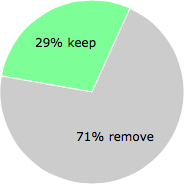
The poll result listed below shows what users chose to do with ie3sh.exe. 71% have voted for removal. Based on votes from 2722 users.
NOTE: Please do not use this poll as the only source of input to determine what you will do with ie3sh.exe.
Malware or legitimate?
If you feel that you need more information to determine if your should keep this file or remove it, please read this guide.
And now some shameless self promotion ;)
 Hi, my name is Roger Karlsson. I've been running this website since 2006. I want to let you know about the FreeFixer program. FreeFixer is a freeware tool that analyzes your system and let you manually identify unwanted programs. Once you've identified some malware files, FreeFixer is pretty good at removing them. You can download FreeFixer here. It runs on Windows 2000/XP/2003/2008/2016/2019/Vista/7/8/8.1/10. Supports both 32- and 64-bit Windows.
If you have questions, feedback on FreeFixer or the freefixer.com website, need help analyzing FreeFixer's scan result or just want to say hello, please contact me. You can find my email address at the contact page.
Comments
Please share with the other users what you think about this file. What does this file do? Is it legitimate or something that your computer is better without? Do you know how it was installed on your system? Did you install it yourself or did it come bundled with some other software? Is it running smoothly or do you get some error message? Any information that will help to document this file is welcome. Thank you for your contributions.
I'm reading all new comments so don't hesitate to post a question about the file. If I don't have the answer perhaps another user can help you.
Since several days now, when I start up my notebook, I get that litle menu that says that it's not possible to find ie3sh.exe.
First of all, I totaly don't know what it is and where to find it also! Can you give me please some info about this ie3sh.exe and what I can do to solved it? Thanks already.
Friendly greetings
# 28 Oct 2009, 16:15
Tony Makin writes
I am having the same problem as Constantin. Can anyone help me?
# 5 Nov 2009, 9:11
David C. Nusbaum writes
I recently started having error messages pop up every time I start my laptop, they are:
ie3sh.exe - Unable To Locate Component
This application has failed to start because BHO.DLL was not found. FRe-installing this application may fix this problem.
I close this and then I get this error:
IE3SH Application has stopped working. A problem caused the program to stop working correctly. Windows will close the program and notify you if a solution is available.
I started getting these after installing a cartoon program from facebook.
I looked online and it was suggested I uninstall safeguard plus. I did and I still get the errors. Any help would be much appreciated.
# 7 Nov 2009, 22:06
Andrew Oliver writes
This notification at start up that ie3sh.exe application failed. I was told that it is a virus. What harm can it do to my pc?
# 11 Nov 2009, 12:24
james mann writes
am havibg IE3SH issue it is bugging the hell out of me think its been removed after virus. i want it back vista is annying enough without this to
# 12 Nov 2009, 12:42
Mr.Green writes
weird...I don't remember installing this program and here yet when I start win7 msg appears: "ie3sh.exe -System Error
The program can't start because BHO.DLL is missing from your computer. Try reinstalling program to fix this problem".
# 26 Nov 2009, 3:06
Stuart writes
Roger Karlsson was spot on. I was getting an IE script error every time I opened IE. Then I got the BHO.DLL error after PCCillin detected spyware and removed it and the system rebooted. I uninstalled the Tatoon apps and everything is great now.
# 30 Nov 2009, 2:39
Tony Makin writes
I also did what Roger suggested and it worked as well for me. So thank you Roger!
# 30 Nov 2009, 3:35
Gina writes
Roger Karlsson - THANK YOU THANK YOU THANK YOU - I have been spending hours scanning and cleaning. With no success -but when I un-installed Search Guard Plus and My Web Tattoo - I got rid of the IE3SH and BHO.dll is now gone.
AMEN!!
# 3 Dec 2009, 14:03
Jacob F writes
If you have a problem with BHO.dll, or IE3SH errors, just call the company, their phone number is 1-800-831-8940
# 9 Dec 2009, 11:33
stefi512 writes
Dico solo che questo maledetto "ie3sh" incasina tutti, a me ha portato 4 virus in un solo colpo, ora l'antivirus l'ha Individuato e l'ha messo nel cestino dei virus ma mi esce sempre un messaggio Che consiglia di reinstallarlo altrimenti Il pc nn funzionerà correttamente ma anche se x caso volessi farlo: dove lo trovo? Che devo fare? Cosa Comporta l'assenza o la presenza di questo "ie3sh"? Qualcuno + esperto di me mi Aiuti! X FAVORE! Ciao ciao
# 17 Dec 2009, 14:24
Alvaro writes
The stupid question above should be changed into something that deserves a reasonably intelligent answer.
This whole tattoo thing is nothing but a pain in the a** makes the PC get hooked to something that's reported as a TROYAN by Avast and Norton scanners, it has to be "quaranteeened" and better removed from "Programs and ..." becoming an ANNOYING ERROR REPORT every time the PC gets started. There is nothing to do to get rid from this Error report. Roger Karlsson should be sued for launching this TROYAN BUG that causes PC's malfunction... ALWAYS.
# 17 Dec 2009, 18:52
javier writes
ok, ok, gracias Roger Le desinstalado los tatuajes esos y todo funciona correctamente. No se como se instalaron en mi PC. Gracias de nuevo.
# 20 Dec 2009, 14:09
Kylie writes
Joan Beaudry writes
Roger Karlsson is absolutely right! Thank you!
If you have been on "Facebook" and or have one of these installed on your computer "My Web Tattoo", "Fast Browser Search", "Tattoodle", "Tattoodle Skins", "Search Guard Plus", "My Face LOL" and "Tattoons". JUST UNINSTALL IT!
It fixed my problem.
# 15 Jan 2010, 5:24
Gord writes
I have removed the (Fast Browser Search) toolbar, deleted the Tadoodle app from Facebook and yet when I reboot I am still getting the IE3SH.exe and BHO.dll error message. This is making me insane....can anyone help further? Cheers.
# 20 Mar 2010, 6:46
Selena writes
I've been getting the same error message for a while now! I've been trying to figure it out!!! I insalled Tatoodle through Facebook, and I think I uninstalled it when the error message began... I can't find it in my software list to uninstall..... Now how do I get rid of the message????
# 21 Mar 2010, 18:38
Selena writes
After double-checking my program list, I realized it was under Fast Browner Search (My Web Tattoo)!!! I uninstalled this program, restarted my computer, and now the error message is gone! Thank goodness!!!!!
# 21 Mar 2010, 18:50
Seth writes
Roger Karlsson is the smartest person alive, thank you so much!!!
# 26 Mar 2010, 8:48
Kim A writes
My error message appeared after AVG noticed spyware and isolated it. I assume it was the .dll file. I got rid of mine. Thank you for all your help.
# 13 May 2010, 6:10
Bruce writes
You do not want this file or the folder on your machine. I was having real issues with Flash Apps and general Internet slowing which all cleared up the instant I stopped this program from running. Check your Task Master Process tab to see if it is running and stop it both from running and from loading on start up. Reboot and nuke the folder from your harddrive. I don't know who created this piece of feldercarb, but I heard somewhere that it is part of a scanning program that loads when you run one of those "Scan your disk for viruses" pop-ups. Another example of the over-reaching greed of some developers, me thinks.
# 14 May 2010, 13:01
Fabio A writes
I made this way:
Computer
C:
Programs
SGPSA
I found 3 files (one of them was ie3sh.exe, I don't remember the name of the second one), clicked on right key of my mouse on the first and second of them and deleted them: the only one that can't be deleted is the third one called "SearchAssistant" (a DLL file);
I turned off my pc, then turned it on and NO MORE PROBLEMS!!!!! And my pc works OK!!! I don't know if I followed a correct procedure, but I resolved the problem in this way!
If somebody knows if this is the correct way, please let me know.
# 16 May 2010, 9:45
roy a writes
i did the same thing. just deleted all three files individually. all three went to the recycle bin, then i emptied the recycle bin..over and done with.
you could probably get all three at once by deleting the
SGPSA folder. I did mine one by one just to make sure.
don't panic people, it's not that bad.
...goss
# 16 May 2010, 16:12
Fabio A writes
Hi Roy! I tried (it's been the first thing I made) to delete the whole folder, but it wasn't possible, 'cos the file SearchAssistant can't be deleted. But other 2 files were deleted and the problem seems to be solved. Maybe we have different systems, I don't know (I've Vista Home Premium). Bye.
# 17 May 2010, 3:41
Fabio A writes
Hi, I tried many many times to delete serchassistant.dll but nothing to do; Casually, I deleted "Open office installation" and "Muse score installation" (never used the first one, Muse score, instead is installed and works), tried to eliminate searchassistand.dll and just done...I'm not an expert, but I think this file was related to Open office or Muse score...let me know your opinion
# 17 May 2010, 4:59
Szilvia writes
Hi, I have problems with this ie3sh.exe. I want to remove it from my computer. I have downloaded this freefix removal tool from your website, i have already ran a scan but I don't find it on the list. However whenever I start my computer it comes the same message again.
Please let me know where to look and how to delete. (I am not very good with computers)
Thanks!
# 30 Jun 2010, 11:23
johanna h writes
My computer is doing this also saying IE3SH application not found but now I have no internet . some how its been deleted . Affraid its bcause of this
# 13 Sep 2010, 20:59
/cheri/ writes
I need a free fix for the IE3SH that doen't require a credit card or paypal to fix my problem can anyone plz help?
# 28 Oct 2010, 17:42
Stoshew writes
Here is what I did and it worked:
Computer
C:
Programs
SGPSA
and delete that, and the search guard ones and you will be good to go.
# 19 Jan 2011, 8:44
Craig writes
I fixed the problem this way:
Go to:
Computer
C:
Program Files:
SGPSA
I found 2 files (one of them was ie3sh.exe, I deleted that one), the other file I found was "SearchAssistant" (a DLL file), I could not delete that file so I moved it to my desktop and deleted the SGPSA file from my computer!
After re-booting my computer I simply deleted DLL file from my desktop and then emptied my recycle bin and restarted my computer. All Fine Now :)
# 6 Apr 2011, 8:06
Spiritual Ninja writes
Yeah Roger YOU'RE THE MAN!!! Got rid of it right away LOL I love you
# 2 Jul 2012, 16:34
Constantin writes