What is sshnas21.dll?
sshnas21.dll is usually located in the 'C:\Windows\system32\' folder.
If you have additional information about the file, please share it with the FreeFixer users by posting a comment at the bottom of this page.
Digital signatures [?]
sshnas21.dll is not signed.
Hashes [?]
| Property | Value |
|---|---|
| MD5 | d88a8b53463a139929f2fa08435a8554 |
| SHA256 | b9af062ab8242bcd4ad87de0f5f82c8d0ad70573423096ca481315523b6bae9f |
What will you do with sshnas21.dll?
To help other users, please let us know what you will do with sshnas21.dll:
What did other users do?
The poll result listed below shows what users chose to do with sshnas21.dll. 40% have voted for removal. Based on votes from 2418 users.
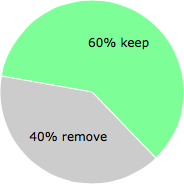
NOTE: Please do not use this poll as the only source of input to determine what you will do with sshnas21.dll.
Malware or legitimate?
If you feel that you need more information to determine if your should keep this file or remove it, please read this guide.
And now some shameless self promotion ;)
 Hi, my name is Roger Karlsson. I've been running this website since 2006. I want to let you know about the FreeFixer program. FreeFixer is a freeware tool that analyzes your system and let you manually identify unwanted programs. Once you've identified some malware files, FreeFixer is pretty good at removing them. You can download FreeFixer here. It runs on Windows 2000/XP/2003/2008/2016/2019/Vista/7/8/8.1/10. Supports both 32- and 64-bit Windows.
If you have questions, feedback on FreeFixer or the freefixer.com website, need help analyzing FreeFixer's scan result or just want to say hello, please contact me. You can find my email address at the contact page.
Comments
Please share with the other users what you think about this file. What does this file do? Is it legitimate or something that your computer is better without? Do you know how it was installed on your system? Did you install it yourself or did it come bundled with some other software? Is it running smoothly or do you get some error message? Any information that will help to document this file is welcome. Thank you for your contributions.
I'm reading all new comments so don't hesitate to post a question about the file. If I don't have the answer perhaps another user can help you.
ko2 writes
my system was infected by that dll. i used avira, and detected as TR/Agent.228864.wkg. my antivirus was completely destroyed this malware.
# 13 Jan 2010, 19:18
Dale E writes
this was removed for me by AVG but now every time I boot my computer I get the message that the system can't find sshnas21.dll
Very annoying
# 16 Jan 2010, 0:08
james E writes
my computer was infected by sshnas21.dll, same as roger karlsson,
"RUNDLL
Error loading C:\Windows\system32\sshnas21.dll
The specified module could not be found."
# 17 Jan 2010, 15:09
Adrienn writes
Hello Roger,
I also had this malware on my computer and AVG removed it. I had the same error message as Dale, so I had FreeFixer to remove it did as you suggested in a previous post.
AVG popped up, telling me it deleted the malware and my laptop freezed out. A couple of minutes later I got a blue screen and a reboot. Since then, I have 6 little desktops on my computer (starting from rebooting).. I had a BIOS reset to default which cured it once but after another reboot the 6 little screens are back and I can't do nothing about it...
Do you have any suggestion?
Thanks,
Adrienn
# 18 Jan 2010, 0:44
-Dale- writes
It worked great for me thanks Roger. No more problems since then though I had to run both AVG and Superantispyware in safe mode to get rid of all the file infections...... all because I wanted to watch a video in firefox and thought I was getting an add on to allow me to do so.....
thanks again
Dale
# 18 Jan 2010, 6:32
Dan Apostol writes
I had a the same problem and AVG seems solves its, but at 5 minute interval announced me that I have this malware. I used FreeFixer and now all it's all right. Thank you very much.
# 19 Jan 2010, 9:20
Ludovico writes
Hi, I have this sshnas21.dll on my computer. The antivir guard gives me a warning but doesn't fix the problem. I've tried to follow the instructions and installed freefixer, but it doesn't identify the file (which is strange because i can browse to the path C:/windows/system32/sshnas21.dll and see the file).
Any idea? Whenever I do an action with a browser I get the message from Avira that this file tries to access the system!
# 19 Jan 2010, 11:23
TAXMAN writes
I have mcafee, and it too kept waarning me like every minute but could not removve. I searched and could not delete it, so I right clicked on it and scanned with mcafee. It did quarantine it this time and removed on reboot.
# 20 Jan 2010, 6:39
dionsmom writes
I also had that error msg after my PC starts up. I did the freefixer and it removed it. Thanks!
# 30 Jan 2010, 13:13
Alain writes
I've got the "RUNDLL
Error loading C:\Windows\system32\sshnas21.dll
The specified module could not be found." message but can't remove it because freefixer doesa not work on x64 windows... :_(
# 2 Feb 2010, 12:17
Alain writes
@Roger
Thanks! The startup error does not show any longer, but now it seems that the rest of the Trojan virus is still working! NOD32 does not seem to find it, it's quite anoying.
Thanks again anyway Roger! (btw I'm eager to try the upcoming 64bit freefixer version soon ;)!)
# 2 Feb 2010, 16:21
Kostadin Velkov writes
Hello,
I have an error"..sshnas21.dll can not be found"at everu start up.The file is cleaned by my antivirus program ,but this error still appears every time I run the computer.
I downloaded your program to clear regustry and ran it -but unfortunatelly it does not work for 64-bit system.
So ,please, can you help me how to remove this error at start up of computer.
Thank you in advance,
Best Regards,
Kostadin
# 21 Feb 2010, 7:24
Lore writes
@Roger
Same problem as Alain! I work with x64 windows, removed sshnas21.dll with AVG, but still have an error message at start up. I tried to untick it in msconfig.exe -> Startup tab but didn't find the sshnas21.dll entry in the list...
Thank you for your time!
Lore
# 25 Feb 2010, 4:22
Mike nikol writes
Hello,
I had a similar problem yesterday with my laptop. The laptop is "running" 24 hours per day. When i tried to open Firefox (on windows vista 32Bit) my AVAST gave me a popup window with virus found and the famous sshnas21.dll. It propossed me to move it to quarantine box but it couldn't. Also, avast couldn't delete it or fix it or ... Anyway i still have the avast popup screen on my laptop and no reboot yet. Any suggestion??
(thanks anyway!!)
# 27 Feb 2010, 4:17
Donny writes
Just download "Malwarebytes"(Free) install and run scan.
It takes out the bastard:-)
# 22 Mar 2010, 14:37
+peter+ writes
@Roger Karlsson
thanks man! that really did the job. Freefixer removed the malware that MacAfee only recognised
for info, I used it to get rid of another unwanted, locked exe in my temp folder as well, called svl.exe
again, great tool, excellent post.
# 22 Mar 2010, 15:05
Wing Hang Tse writes
Well, that message did show up when I started my laptop, after I followed the steps sshnas21.dll is indeed deleted, I'm very grateful for that :D Thanks for having this incredible site!
But unfortunately there's still a problem which I can't solve. From time to time there'll be a pop up (or that's what I call it) from Internet Explorer while I'm using Firefox. What could this be?
# 1 Apr 2010, 8:36
deepak writes
i'm also havin rundll error in sshns21 while restartin... also i cant shut down my laptop. whenever given for shutdown it goes for restartin .. plse slove my problem..
# 2 Apr 2010, 4:44
Wing Hang Tse writes
Well, it seems like Windows Defender has detected another unwanted software and it has been fixed by Windows Defender as well :D Thank you for offering your help ;D
# 4 Apr 2010, 1:46
hanane writes
I have the same error message everytime I reboot my laptop C:\Windows\system32\sshnas21.dll
The specified module could not be found."
I run freefixer but I could not find the following item on the list:
rundll32.exe C:\Windows\system32\sshnas21.dll,AllocConsoleA
Instead I have :
rundll32.exe C:\Windows\system32\sshnas21.dll,BackupReadW (file is missing)
# 21 May 2010, 15:09
bambucha writes
I found it in registry (run ->regedit) witn name Carneval
I just searched in regedit-> sshnas
it was on local machine-> windows-> run
# 28 May 2010, 23:13
nazmi writes
thanks for the software .the 'sshnas21.dll' problem is resolved and some other problems with this .i hope this software will evolve to be a geater software.thanks again!!!!!!
# 12 Jun 2010, 10:56
bertpix writes
great, freefixer has done the job nicely. Tnx very much and keep up the good work.
# 24 Oct 2010, 5:14
rnochezmc writes
Agree with all, works just fine as per Roger's guidelines. It did took longer on my machine with Windows 7 home edition and AVG antivirus but everything went smoothly and with no harm as per Roger's advice.
Many thanks !
# 28 Oct 2010, 12:00
Bobby E writes
i was having the same problem from last few weeks, tried so many things but no luck. honestly i was scared to do it the through this method but i took risk. but i m really lucky to do it thanks it resolve my problem. so easy to do it thanks again
# 10 Nov 2010, 4:56
/Diane/ writes
just want to say thanks for this free software.it has indeed helped remove the sshnas21 error i receive on start-up.kudos! =D
# 17 May 2011, 21:17
Roger Karlsson writes