What is LMIR0002.tmp_r.bat?
LMIR0002.tmp_r.bat is usually located in the 'c:\documents and settings\%USERNAME%\local settings\application data\' folder.
None of the anti-virus scanners at VirusTotal reports anything malicious about LMIR0002.tmp_r.bat.
If you have additional information about the file, please share it with the FreeFixer users by posting a comment at the bottom of this page.
Vendor and version information [?]
LMIR0002.tmp_r.bat does not have any version or vendor information.
Digital signatures [?]
LMIR0002.tmp_r.bat is not signed.
VirusTotal report
None of the 55 anti-virus programs at VirusTotal detected the LMIR0002.tmp_r.bat file.
Hashes [?]
| Property | Value |
|---|---|
| MD5 | 108f8422f35e476ae7f02a13e6e7fb0b |
| SHA256 | 12722d83ae5b317095ba854b64e995088fa5d7a46894ab376b7aacc1feb7fb4f |
What will you do with the file?
To help other users, please let us know what you will do with the file:
What did other users do?
The poll result listed below shows what users chose to do with the file. 86% have voted for removal. Based on votes from 14 users.
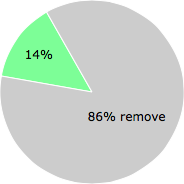
NOTE: Please do not use this poll as the only source of input to determine what you will do with the file. Only 14 users has voted so far so it does not offer a high degree of confidence.
Malware or legitimate?
If you feel that you need more information to determine if your should keep this file or remove it, please read this guide.
And now some shameless self promotion ;)
 Hi, my name is Roger Karlsson. I've been running this website since 2006. I want to let you know about the FreeFixer program. FreeFixer is a freeware tool that analyzes your system and let you manually identify unwanted programs. Once you've identified some malware files, FreeFixer is pretty good at removing them. You can download FreeFixer here. It runs on Windows 2000/XP/2003/2008/2016/2019/Vista/7/8/8.1/10. Supports both 32- and 64-bit Windows.
If you have questions, feedback on FreeFixer or the freefixer.com website, need help analyzing FreeFixer's scan result or just want to say hello, please contact me. You can find my email address at the contact page.
Comments
Please share with the other users what you think about this file. What does this file do? Is it legitimate or something that your computer is better without? Do you know how it was installed on your system? Did you install it yourself or did it come bundled with some other software? Is it running smoothly or do you get some error message? Any information that will help to document this file is welcome. Thank you for your contributions.
I'm reading all new comments so don't hesitate to post a question about the file. If I don't have the answer perhaps another user can help you.
This is a batch file. I saw it on my start up programs and could not open it. It's only taking up 1 kb. and is not causing problems. I will keep it for now.
# 28 Jun 2018, 18:52
Justme writes
it is a batch file
@echo off
echo Cleaning up LogMeIn Rescue Applet folders...
rd /S/Q "C:\Program Files (x86)\LogMeIn Rescue Applet\LMIR0002.tmp" > NUL
rd /S/Q "C:\Users\dareh\AppData\Local\LogMeIn Rescue Applet\LMIR0001.tmp" > NUL
rd /Q "C:\windows\system32\config\systemprofile\AppData\Local\LogMeIn Rescue Applet"
rd /Q "C:\Users\dareh\AppData\Local\LogMeIn Rescue Applet"
rd /Q "C:\Program Files (x86)\LogMeIn Rescue Applet"
del "C:\Program Files (x86)\LMIR0002.tmp.bat"
del "C:\Program Files (x86)\LMIR0002.tmp_r.bat"
however, it seems to me the last two lines of the batch file is telling it to delete this file, which it doesn't do. is created by LoginmeIN applet, which I am going to uninstall. I don't need to access my computer remotely and it was probably put on there by HP so they can control my computer, which they did at one point in time. Keep in mind, this is just supposition on my part, but it makes sense.
# 27 Sep 2018, 4:57
dsi1 writes
It is a LogMeInRescue file used to remove it's own files from install and sometimes remains behind. LMIR is used by various Tech support services to remote in and fix issues that take too long to explain, or are too difficult for the average user to follow directions over the phone or text. It's harmless bit of leftover detritus and you have now spent more time ferreting it out than it is worth. delete it, and the next time you get a LMIR hookup with a remote Tech, you will know what it is. Which is exactly how I found out, so I am passing it along.
# 3 Jun 2019, 9:27
crazcat writes
Well, just want to add that while I was at my computer my mouse started moving on its own up to my photos folder and started deleting pictures. I called my husband at work to see if he was somehow doing this, cause at the time I had NO CLUE what Hacking was about! He said NO, run go unplug the computer as fast as possible. Someone was remotely doing this, needless to say, when we turned back on we had a Microsoft page on our laptop stating we were on a SECURE SECRETIVE WEBSITE and MUST get off IMMEDIATELY! Than... we got another message asking for $$$ to pay for our photos to be returned!! ALso got notifications from a Net watcher app that my email passwords had been compromised, so on and so on!!!IT was literally right around the time we allowed Frontier COmmunications our internet provider to remotely use LOGMEIN to help us with a problem!! We took our computer in to multiple techs and when asked what internet provider we had, they stated buy a MODEM of your own ASAP!! DUE to THEY LOVE logging in to their customers networks WITHOUT PERMISSION!!!!!!!!!!!!!!!!!!!!!!!!!!!!!!
# 21 Aug 2019, 9:38
Big Bob writes