What is MyOSProtect.dll?
MyOSProtect.dll is part of MyOSProtect.dll and developed by MyOSCompany according to the MyOSProtect.dll version information.
MyOSProtect.dll is usually located in the 'C:\Windows\system32\' folder.
Some of the anti-virus scanners at VirusTotal detected MyOSProtect.dll.
If you have additional information about the file, please share it with the FreeFixer users by posting a comment at the bottom of this page.
Vendor and version information [?]
The following is the available information on MyOSProtect.dll:
| Property | Value |
|---|---|
| Product name | MyOSProtect.dll |
| Company name | MyOSCompany |
| Comments | MyOSProtect.dll |
| Product version | 2.2.9.10 |
| File version | 2.2.9.10 |
Here's a screenshot of the file properties when displayed by Windows Explorer:
| Product name | MyOSProtect.dll |
| Company name | MyOSCompany |
| Comments | MyOSProtect.dll |
| Product version | 2.2.9.10 |
| File version | 2.2.9.10 |
Digital signatures [?]
MyOSProtect.dll is not signed.
VirusTotal report
1 of the 55 anti-virus programs at VirusTotal detected the MyOSProtect.dll file. That's a 2% detection rate.
| Scanner | Detection Name |
|---|---|
| Symantec | WS.Reputation.1 |

Folder name variants
MyOSProtect.dll may also be located in other folders than C:\Windows\system32\. The most common variants are listed below:
- C:\Windows\SysWOW64\
Hashes [?]
| Property | Value |
|---|---|
| MD5 | 0b85ececdb98c8e86df6cb5e7491e7b1 |
| SHA256 | 683f69fd6c8cc94b46a09b7c286169eb89745417a9c6c11e370ec0a4e93db0f4 |
What will you do with the file?
To help other users, please let us know what you will do with the file:
What did other users do?
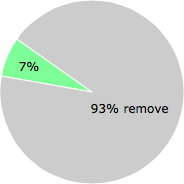
The poll result listed below shows what users chose to do with the file. 93% have voted for removal. Based on votes from 215 users.
NOTE: Please do not use this poll as the only source of input to determine what you will do with the file.
Malware or legitimate?
If you feel that you need more information to determine if your should keep this file or remove it, please read this guide.
And now some shameless self promotion ;)
 Hi, my name is Roger Karlsson. I've been running this website since 2006. I want to let you know about the FreeFixer program. FreeFixer is a freeware tool that analyzes your system and let you manually identify unwanted programs. Once you've identified some malware files, FreeFixer is pretty good at removing them. You can download FreeFixer here. It runs on Windows 2000/XP/2003/2008/2016/2019/Vista/7/8/8.1/10. Supports both 32- and 64-bit Windows.
If you have questions, feedback on FreeFixer or the freefixer.com website, need help analyzing FreeFixer's scan result or just want to say hello, please contact me. You can find my email address at the contact page.
Comments
Please share with the other users what you think about this file. What does this file do? Is it legitimate or something that your computer is better without? Do you know how it was installed on your system? Did you install it yourself or did it come bundled with some other software? Is it running smoothly or do you get some error message? Any information that will help to document this file is welcome. Thank you for your contributions.
I'm reading all new comments so don't hesitate to post a question about the file. If I don't have the answer perhaps another user can help you.
Mine was in a folder Web Protect in Program Files. I went to The windows control panel/programs and tried uninstalling Web Protect.... That is when all heck broke loose... When Web Protect started UNINSTALLING, it starts INSTALLING a bunch of other junk inside the uninstall. If you run HiJack this or ccCleaner Registry.... The OSprotect.dll's are sitting there, but must be getting loaded early as when you go into Web Protect Folder you can't do a direct "delete" on the myosprotect application (invalid file handle error).
Hijack warns me removing the .dll (4 of them)from the registry is "risky".
I reverted IE9 back to IE8 and that cleared up my slow internet speed
# 17 Sep 2014, 17:21
jims writes
I found OSprotect on my PC and it won't let me connect to the internet. I had used the Control Panel uninstall to take off Adaware. What else could it be. I had to use another PC to find this site and solutions I want to try.
# 2 Oct 2014, 13:51
Mr Isaac writes
Oh my god, same here, jims! I'm lucky enough to have windows running on a mac, so I just switched over to mac to go online and troubleshoot. Nothing has worked so far. I'm going to try using safe mode.
# 8 Oct 2014, 11:08
jims writes
We also tried safe mode and even dropping back to an older system back up but it always fails saying it can't reove that OSP file. Let us know if yours works.
# 8 Oct 2014, 13:08
Frank 7155 writes
I'm having the same problem. Norton notified me that it had detected a suspicious adware file (usually Norton works in the background so I react when I get a live notification). I let Norton "fix" the problem and now I can't get online and the pc is reporting the MYOSPROTECT.dll file is missing or corrupt and I can't get online. I've tried a system restore and it won't complete.
# 16 Nov 2014, 6:24
Frank 7155 writes
I did find this on another site and will run the program when I get back home as I do have it on my pc; I didn't think of this last night.
"Myosprotect.dll
...
This file has been reported to be part of a spyware/malware/trojan. It is likely that the problem you are experiencing is linked directly to the spyware/malware/trojan rather than an actual missing DLL-file and the recommended course of action is to first locate/remove the Malware. We do not recommend downloading this file.
Your first and easiest option is to get a reliable anti-malware software suite to scan your system and clean out any possible infestation. We strongly recommend Malwarebytes' Anti-Malware Premium as the current best option on the market."
# 16 Nov 2014, 6:33
Michael writes
I am having the same problem and am going nuts. It all happened after I let Norton do it's thing and then rebooted. I have no connectivity, I installed the free version of Malwarebytes and it removed a bunch of stuff and now I have myosprotect.dll sitting in the system32 folder with 0 kb. Running XP #3
# 26 Nov 2014, 13:03
Michael writes
I am having the same problem and am going nuts. It all happened after I let Norton do it's thing and then rebooted. I have no connectivity, I installed the free version of Malwarebytes and it removed a bunch of stuff and now I have myosprotect.dll sitting in the system32 folder with 0 kb. Running XP #3
# 26 Nov 2014, 15:36
Pop writes