What is UNPCampaignManager.exe?
UNPCampaignManager.exe is part of Microsoft® Windows® Operating System and developed by Microsoft Corporation according to the UNPCampaignManager.exe version information.
UNPCampaignManager.exe's description is "UNP CampaignManager"
UNPCampaignManager.exe is digitally signed by Microsoft Windows.
UNPCampaignManager.exe is usually located in the 'C:\WINDOWS\System32\UNP\' folder.
None of the anti-virus scanners at VirusTotal reports anything malicious about UNPCampaignManager.exe.
If you have additional information about the file, please share it with the FreeFixer users by posting a comment at the bottom of this page.
Vendor and version information [?]
The following is the available information on UNPCampaignManager.exe:
| Property | Value |
|---|---|
| Product name | Microsoft® Windows® Operating System |
| Company name | Microsoft Corporation |
| File description | UNP CampaignManager |
| Internal name | UNPCampaignManager.exe |
| Original filename | UNPCampaignManager.EXE |
| Legal copyright | © Microsoft Corporation. All rights reserved. |
| Product version | 10.0.14393.1062 |
| File version | 10.0.14393.1062 (rs1_release_sec.170320-1842) |
Here's a screenshot of the file properties when displayed by Windows Explorer:
| Product name | Microsoft® Windows® Operating System |
| Company name | Microsoft Corporation |
| File description | UNP CampaignManager |
| Internal name | UNPCampaignManager.exe |
| Original filename | UNPCampaignManager.EXE |
| Legal copyright | © Microsoft Corporation. All rights.. |
| Product version | 10.0.14393.1062 |
| File version | 10.0.14393.1062 (rs1_release_sec.170.. |
Digital signatures [?]
UNPCampaignManager.exe has a valid digital signature.
| Property | Value |
|---|---|
| Signer name | Microsoft Windows |
| Certificate issuer name | Microsoft Windows Production PCA 2011 |
| Certificate serial number | 33000001066ec325c431c9180e000000000106 |
VirusTotal report
None of the 61 anti-virus programs at VirusTotal detected the UNPCampaignManager.exe file.
Hashes [?]
| Property | Value |
|---|---|
| MD5 | ae9c510dfbf5eb3890ef0a325495924f |
| SHA256 | 075dc281a06f4949e5e843ca02ffc27dbec344d7939be7891433a6e8d221b7f4 |
Error Messages
These are some of the error messages that can appear related to unpcampaignmanager.exe:
unpcampaignmanager.exe has encountered a problem and needs to close. We are sorry for the inconvenience.
unpcampaignmanager.exe - Application Error. The instruction at "0xXXXXXXXX" referenced memory at "0xXXXXXXXX". The memory could not be "read/written". Click on OK to terminate the program.
UNP CampaignManager has stopped working.
End Program - unpcampaignmanager.exe. This program is not responding.
unpcampaignmanager.exe is not a valid Win32 application.
unpcampaignmanager.exe - Application Error. The application failed to initialize properly (0xXXXXXXXX). Click OK to terminate the application.
What will you do with the file?
To help other users, please let us know what you will do with the file:
What did other users do?
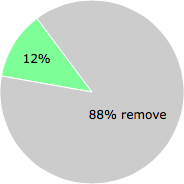
The poll result listed below shows what users chose to do with the file. 88% have voted for removal. Based on votes from 195 users.
NOTE: Please do not use this poll as the only source of input to determine what you will do with the file.
Malware or legitimate?
If you feel that you need more information to determine if your should keep this file or remove it, please read this guide.
And now some shameless self promotion ;)
 Hi, my name is Roger Karlsson. I've been running this website since 2006. I want to let you know about the FreeFixer program. FreeFixer is a freeware tool that analyzes your system and let you manually identify unwanted programs. Once you've identified some malware files, FreeFixer is pretty good at removing them. You can download FreeFixer here. It runs on Windows 2000/XP/2003/2008/2016/2019/Vista/7/8/8.1/10. Supports both 32- and 64-bit Windows.
If you have questions, feedback on FreeFixer or the freefixer.com website, need help analyzing FreeFixer's scan result or just want to say hello, please contact me. You can find my email address at the contact page.
Comments
Please share with the other users what you think about this file. What does this file do? Is it legitimate or something that your computer is better without? Do you know how it was installed on your system? Did you install it yourself or did it come bundled with some other software? Is it running smoothly or do you get some error message? Any information that will help to document this file is welcome. Thank you for your contributions.
I'm reading all new comments so don't hesitate to post a question about the file. If I don't have the answer perhaps another user can help you.
I still don't know what it does - is it, as I suspect, some kind of marketing applet
# 27 Apr 2017, 3:17
Cory Benjamin writes
UNP stands for "Universal Notification Platform". It is part of Windows 10. You probably don't want to remove it without understanding the ramifications of doing so. I spent a few minutes searching Google and was unable to come to a consensus on what, if anything, removing UNP would break.
# 23 May 2017, 23:57
DEBORAH M BOWDEN writes
I am not happy knowing where it came from. I also need to know what is it for and why is it being attached to Win10.
# 24 May 2017, 8:36
Cory Benjamin writes
Thanks for the information Roger, and I agree with everything you said.
As to your original question to me: No, UNPCampaignManager.exe was not causing me any problems. Simply being a program that I was not accustomed to seeing previously in Task Manager is what led me to try to do some research to make sure it was kosher.
Unless I get any additional, concerning, information, I plan on leaving it alone.
Be well.
-Cory
# 1 Jun 2017, 2:27
Zeke Polaris writes
This does not answer my question......... Also, this just showed up today in task manager, never have I heard of this.
# 2 Jun 2017, 19:53
StarPat writes
ZoneAlarm report :
Alert property Alert property value Technical explanation
Program Name UNP CampaignManager A program running on your computer, which either attempted to send an IP packet over the Internet or is waiting for an incoming packet.
Filename UNPCampaignManager.exe The filename of the program that ZoneAlarm found on your computer.
Program Version 10.0.14393.1184 The version of UNP CampaignManager running on your computer.
Program Size 1037152 The size of the program executable file in bytes.
Program MD5 93375e52e78a09dda7e78e8358307b84 The MD5 hash, or number, that uniquely identifies the executable.
Smart Checksum ec4dd6a5af934095c4906238f4b63f57 The SKIMP hash, or number, that uniquely identifies the executable.
Date Modified Apr-02-2017 08:15:34 AM The date when UNPCampaignManager.exe was most recently modified.
Connect Type Access This value can be either Access, which is an Internet connection attempt by UNP CampaignManager or Server, which indicates that UNP CampaignManager is waiting for connections coming in from the Internet.
Remote Port 443 The port UNP CampaignManager is using on the remote computer.
Remote IP Address 72.247.95.174 The IP address of the remote computer that caused the alert.
Localisation de 72.247.95.174 :
L'utilisateur de l'adresse IP 72.247.95.174 (a72-247-95-174.deploy.akamaitechnologies.com - Global Crossing Ltd.) est situé à Cambridge (United States - Massachusetts).
I blocked the connection without finding any anomaly. At the time of the connection request windows 10 had just finished an update.
# 17 Jun 2017, 8:00
StarPat writes
Successful installation: Windows has installed the following update: Windows 10 Creators Update privacy settings for x64-based systems (KB4013214)
# 17 Jun 2017, 8:05
Not required writes
I don't trust it if it doesn't intuitively pair with Microsoft or the base hardware/software. And if it is not possible to obtain an understanding of its purpose by searching online, that is instantly suspicious.
# 20 Jun 2017, 10:13
Mike V writes
Just got a McAfee warning that the program wanted internet access. Based on the info here and elsewhere online I blocked the request this time. Until I find a need to allow internet access I will continue to block. Thanks for all the previous comments!
# 6 Jul 2017, 16:21
Pascal writes
Bonjour,
Suite à une mise à jour de win 10 demande de connexion à internet d' UNP, pour le moment je bloque, bizarre ce win 10 beaucoup de demande connexion, sans aucune explication de Microsoft
Merci à tous pour les échange
# 6 Jul 2017, 20:37
Vince writes
Microsoft claims that UNP Campaign Manager enhances the commuter experience and App AZURE. Since I have a GPS I don't need my PC giving my location nor do I commute nor do I have my PC running when driving. I question Microsoft's explanation same as I don't appreciate their removing my discretion for which upgrades to Windows 10 they now automatically download.
# 7 Jul 2017, 11:48
James writes
I don't like change, and starting eyeing up that UNP older today. Per usual, I couldn't resist deleting something. I deleted it. Then, I restarted my computer, and got a blue screen with a frowny face that said there was a problem. It then said it was "collecting information". Once it said the collection process was 100% complete, the computer just sat there on the blue screen...doing nothing. I hit the power button and turned the computer off. Then, I restarted it. No problem with the restart after the blue screen...booted right up. I have since restarted the computer 4 times with no problems....and the UNP folder is gone.
There was half a gig worth of error dump files that showed up in Disk Cleanup right after all of this (they weren't there right before the blue screen)...and I cleaned those up, too.
Everything seems to be well.
What I hate most about this Creators update are all of the Google Chrome entries in the registry. They have something to do with Windows Security. I hate having google in my registry...but these can't be deleted. Microsoft must be in cahoots with Google now. Pisses me off.
# 9 Jul 2017, 2:55
Guillermo Aldunate writes
Today, Avast intercepted (and moved to the Virus Chest) the UNPCampaignManager.exe file, saying that it could be malware. I left it there. Thus, Avast Antivivrus is aware of this file. Regards, Guillermo
# 9 Jul 2017, 10:48
Brigitte writes
I found a ref saying "UNPCampaignManager.exe is known as Trojan program file located on C:\WINDOWS\System32\UNP\UNPCampaignManager.exe, which can be dangerous for computer machine. Such threat can intrude into computer machine through malicious sites, porn sites, embedded links, spam mail attachments, shareware, freeware downloads, online games and infected USB."
https://www.threatfixer.com/unpcampaignmanager-exe-removal-in-5-minutes/
There is a process to remove the file and the associated files.
# 18 Jul 2017, 1:28
andy writes
From what i get, it does come from Microsoft itself. But what bothers me is when you open an xml doc under C:\Program Files\UNP\CampaignManager\Campaigns\{91be532c-f9f1-406a-9858-43697c6f437a}\Detector.xml (<the last part might be different) you can clearly see that they are sucking up telemetry from you computer. Next in comments you can see that at 1400 they send bitmap quote "Set this to 1440 so that we only send bitmap once per day (data team request), if not included it defaults to 0". Now i don't know about you guys but i for sure would like to know what they are sending to us and what telemetry they are collecting from my computer.
# 24 Jul 2017, 8:49
dave writes
The Universal Notification Platform or UNP usually applies to computers on a domain, a good example is a work computer. There are several ways to hide or remove this notification from appearing on your desktop. However, since the steps will guide you to make changes with your registry files, we suggest that you create a back up of your registry.
https://answers.microsoft.com/en-us/windows/forum/windows_10-security/unp-campaignmanager/231f2a85-4dbc-4f1b-897c-4c6ab7f5314f
# 7 Aug 2017, 4:22
flekso writes
so is this thing dangerous? or is it safe? can anyone give me a straight answer?
# 16 Aug 2017, 22:55
Richard A writes
UNP INFO FROM MS, it is apparently part of their auto update UI for win 10 (can be changed to manual - if you know what you are doing) see -
https://support.microsoft.com/en-us/help/4016551/upgrade-and-privacy-experience-upx-is-displayed-in-the-ui-on-managed-w
Although the link refers to UPX it seems that UPX is the UI to UPN; YOU NEED TO INVOKE THE LINK TO CLARIFY THIS COMMENT
Unfortunately JAMES is right but even if you delete UNPCampaignManager.exe I suspect that MS will find a way of replacing it and you will still get auto updates anyway, The whole industry is tuned to force us to do what they want to do and not to what we (the customers that pay their wage) want. Perhaps we should start a new kind of DIGITAL REVOLUTION and demand what WE want!
# 5 Sep 2017, 14:00
Caddi writes