What is brdiagtool.exe?
brdiagtool.exe is part of The Brother Product Research & Support Program and developed by Brother Industries, Ltd. according to the brdiagtool.exe version information.
brdiagtool.exe's description is "brdiagtool"
brdiagtool.exe is usually located in the 'C:\Program Files (x86)\Brother\BPR2\' folder.
None of the anti-virus scanners at VirusTotal reports anything malicious about brdiagtool.exe.
If you have additional information about the file, please share it with the FreeFixer users by posting a comment at the bottom of this page.
Vendor and version information [?]
The following is the available information on brdiagtool.exe:
| Property | Value |
|---|---|
| Product name | The Brother Product Research & Support Program |
| Company name | Brother Industries, Ltd. |
| File description | brdiagtool |
| Internal name | brdiagtool.exe |
| Original filename | brdiagtool.exe |
| Legal copyright | Copyright 2016 Brother Industries, Ltd. |
| Product version | 3.0.1.0 |
| File version | 3.0.1.0 |
Here's a screenshot of the file properties when displayed by Windows Explorer:
| Product name | The Brother Product Research & Suppo.. |
| Company name | Brother Industries, Ltd. |
| File description | brdiagtool |
| Internal name | brdiagtool.exe |
| Original filename | brdiagtool.exe |
| Legal copyright | Copyright 2016 Brother Industries, L.. |
| Product version | 3.0.1.0 |
| File version | 3.0.1.0 |
Digital signatures [?]
brdiagtool.exe is not signed.
VirusTotal report
None of the 60 anti-virus programs at VirusTotal detected the brdiagtool.exe file.

Hashes [?]
| Property | Value |
|---|---|
| MD5 | 8fa1abc4f3144cb6d17c84416afa51b9 |
| SHA256 | 5b3e1dfbf82e864199ece1f86bb2f5bad7443421a76e6a9a6ca0f3a3d3379a38 |
Error Messages
These are some of the error messages that can appear related to brdiagtool.exe:
brdiagtool.exe has encountered a problem and needs to close. We are sorry for the inconvenience.
brdiagtool.exe - Application Error. The instruction at "0xXXXXXXXX" referenced memory at "0xXXXXXXXX". The memory could not be "read/written". Click on OK to terminate the program.
brdiagtool has stopped working.
End Program - brdiagtool.exe. This program is not responding.
brdiagtool.exe is not a valid Win32 application.
brdiagtool.exe - Application Error. The application failed to initialize properly (0xXXXXXXXX). Click OK to terminate the application.
What will you do with brdiagtool.exe?
To help other users, please let us know what you will do with brdiagtool.exe:
What did other users do?
The poll result listed below shows what users chose to do with brdiagtool.exe. 76% have voted for removal. Based on votes from 103 users.
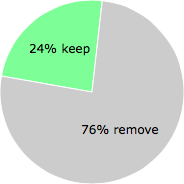
NOTE: Please do not use this poll as the only source of input to determine what you will do with brdiagtool.exe.
Malware or legitimate?
If you feel that you need more information to determine if your should keep this file or remove it, please read this guide.
And now some shameless self promotion ;)
 Hi, my name is Roger Karlsson. I've been running this website since 2006. I want to let you know about the FreeFixer program. FreeFixer is a freeware tool that analyzes your system and let you manually identify unwanted programs. Once you've identified some malware files, FreeFixer is pretty good at removing them. You can download FreeFixer here. It runs on Windows 2000/XP/2003/2008/2016/2019/Vista/7/8/8.1/10. Supports both 32- and 64-bit Windows.
If you have questions, feedback on FreeFixer or the freefixer.com website, need help analyzing FreeFixer's scan result or just want to say hello, please contact me. You can find my email address at the contact page.
Comments
Please share with the other users what you think about this file. What does this file do? Is it legitimate or something that your computer is better without? Do you know how it was installed on your system? Did you install it yourself or did it come bundled with some other software? Is it running smoothly or do you get some error message? Any information that will help to document this file is welcome. Thank you for your contributions.
I'm reading all new comments so don't hesitate to post a question about the file. If I don't have the answer perhaps another user can help you.
Bernhard writes
brdiagtool ist bei der Installation meines aktuellen brother-Druckers MFC-J6920DW offenbar automatisch installiert worden. Ich habe brdiagtool in den Einstellungen meines Notebooks in der Autostart-Liste gefunden. Anlass für die Überprüfung der Autostart-Liste war das sukzessive Langsamerwerden des Notebooks. In der Autostart-Liste ist zu brdiagtool - als einzigem Autostart-Programm - angegeben, dass es "hohe Auswirkung" habe. Ich bin IT-Nutzer, aber kein Experte, und kann daher die Bedeutung der Info "Hohe Auswirkung" nicht beurteilen.
Fehlermeldungen - wie hier oben auf dieser Seite beschrieben - habe ich bisher nochnicht erhalten.
FRAGE: Kann sich der Autostart von brdiagtool auf die Geschwindigkeit des Notebooks auswirken?
# 30 Sep 2018, 7:36
Ninha writes
I would like to know if this file causes any damage to the computer, that is, it leaves it crashing or something like that?
email: digiservice@bol.com.br
# 23 Jun 2020, 7:57
Robert writes
The Bridiagtool is a diagnostic tool which Brother gives you the user the opportunity of installing to monitor the running of the Brother device you have just installed, it is most probably very safe but I don't know how much PC resource it uses
# 7 Nov 2020, 8:33
Stupid_Hillbilly writes
As stated in this article THIS FILE IS NOT MALICIOUS, SPAM, OR MAILWARE. It is indeed a file from Brother, their all-in-one Printer/Copier/Scanner/Fax division for example. The file keeps tabs on any brother equipment that can be attached to a P.C. via internal card, or USB. It is there to keep up with the overall functionality of the brother equipment, and related drivers. If a fault, hang, unanticipated reset, paper jam, ink cartridge empty, fail, or malfunction happens. Brdiagtool.exe Will set about collecting the information related to the issue, alert the user, and then if it's a fault or failure of the equipment it sends all that technical data to Brother Corp. It also sends Brother general status reports related to their equipment's overall functionality. Now this is just my opinion, and it has served me well. I am one of the few system builders that recommends that you leave this kind of software operational as much as your user environment can allow. I even recommend that if an enhanced reporting level is offered, that second privacy thing you can either accept or decline with Microsoft, the first one you must say ok too. I do recommend that you include your systems participation in those programs. While it was NOT the case a couple of years ago. This type of software IS actually starting to make a difference in how your system operates, correcting problems in or at near real time. Most consumers will not have any performance issues by leaving these things running. UNLESS, you are an extreme gamer, use complex forecasting or simulation software, cad software, work with large database management software, AND do extreme multitasking across two or three system monitors like me. Then I recommend you do what I did, take any service, or background task. Group them together by classification, Video, Disk, Error Reporting, Indexing, etc. That way you can REM them into a parking slot when you have to break out that whatever that wants to take all the Motherboard RAM, Video RAM, Buss speeds, processor capacity, etc. With a high degree of hang-ups, system crashes, and general annoying dysfunction, very poor system performance! If you try to run a beast of a program with all these things running in the background. If you are fortunate enough to have over 75 TB of disk storage available, most of that in SSD drives. Then a 2 TB NVMe SSD drive will work fine for Windows 10 and has way more than enough room to allow for a separate user profile to be set up for each hardware software contingency.
# 5 Aug 2022, 8:08
OnRappel writes
Thank you for the explanation. It was clear, detailed, and enabled me to make the correct decision in re to turn on/off.
# 3 Feb 2023, 5:31
Tina writes