What is mdnsNSP.dll?
mdnsNSP.dll is part of Bonjour and developed by Apple Inc. according to the mdnsNSP.dll version information.
mdnsNSP.dll's description is "Bonjour Namespace Provider"
mdnsNSP.dll is usually located in the 'C:\Program Files\Bonjour\' folder.
None of the anti-virus scanners at VirusTotal reports anything malicious about mdnsNSP.dll.
If you have additional information about the file, please share it with the FreeFixer users by posting a comment at the bottom of this page.
Vendor and version information [?]
The following is the available information on mdnsNSP.dll:
| Property | Value |
|---|---|
| Product name | Bonjour |
| Company name | Apple Inc. |
| File description | Bonjour Namespace Provider |
| Internal name | mdnsNSP.dll |
| Original filename | mdnsNSP.dll |
| Legal copyright | Copyright (C) 2003-2008 Apple Inc. |
| Product version | 1,0,6,2 |
| File version | 1,0,6,2 |
Here's a screenshot of the file properties when displayed by Windows Explorer:
| Product name | Bonjour |
| Company name | Apple Inc. |
| File description | Bonjour Namespace Provider |
| Internal name | mdnsNSP.dll |
| Original filename | mdnsNSP.dll |
| Legal copyright | Copyright (C) 2003-2008 Apple Inc. |
| Product version | 1,0,6,2 |
| File version | 1,0,6,2 |
Digital signatures [?]
mdnsNSP.dll is not signed.
VirusTotal report
None of the 49 anti-virus programs at VirusTotal detected the mdnsNSP.dll file.
Filename variants
mdnsNSP.dll may also use other filenames. The most common variants are listed below:
- 4ca6d71.rbf
- 2a12a.rbf
- 6bb729d.rbf
- 866b7.rbf
- A0105566.rbf
- A0141254.rbf
- ff8b3.rbf
Folder name variants
mdnsNSP.dll may also be located in other folders than C:\Program Files\Bonjour\. The most common variants are listed below:
- C:\Program Files (x86)\Bonjour\
- C:\Programme\Bonjour\
- C:\Programmi\Bonjour\
- C:\Archivos de programa\Bonjour\
- D:\Program Files\Bonjour\
- C:\Program\Bonjour\
- C:\Programmer\Bonjour\
- C:\Arquivos de programas\Bonjour\
- c:\Config.Msi\
- F:\Program Files\Bonjour\
- E:\Program Files\Bonjour\
- C:\Programas\Bonjour\
- H:\Program Files\Bonjour\
- F:\Archivos de programa\Bonjour\
- I:\Program Files\Bonjour\
- G:\Program Files\Bonjour\
- F:\Programme\Bonjour\
- C:\Programfiler\Bonjour\
- E:\Programme\Bonjour\
Other files also named mdnsNSP.dll
mdnsNSP.dll (813 votes)
Hashes [?]
| Property | Value |
|---|---|
| MD5 | 292f92469efb2fd402e00742c06d539d |
| SHA256 | 607fb70e8f3e8f09139b1851c18878669a5d2f62c2b232636a30fa76ad793dda |
What will you do with mdnsNSP.dll?
To help other users, please let us know what you will do with mdnsNSP.dll:
What did other users do?
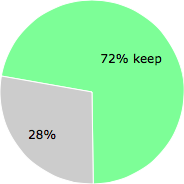
The poll result listed below shows what users chose to do with mdnsNSP.dll. 28% have voted for removal. Based on votes from 282 users.
NOTE: Please do not use this poll as the only source of input to determine what you will do with mdnsNSP.dll.
Malware or legitimate?
If you feel that you need more information to determine if your should keep this file or remove it, please read this guide.
And now some shameless self promotion ;)
 Hi, my name is Roger Karlsson. I've been running this website since 2006. I want to let you know about the FreeFixer program. FreeFixer is a freeware tool that analyzes your system and let you manually identify unwanted programs. Once you've identified some malware files, FreeFixer is pretty good at removing them. You can download FreeFixer here. It runs on Windows 2000/XP/2003/2008/2016/2019/Vista/7/8/8.1/10. Supports both 32- and 64-bit Windows.
If you have questions, feedback on FreeFixer or the freefixer.com website, need help analyzing FreeFixer's scan result or just want to say hello, please contact me. You can find my email address at the contact page.
Comments
Please share with the other users what you think about this file. What does this file do? Is it legitimate or something that your computer is better without? Do you know how it was installed on your system? Did you install it yourself or did it come bundled with some other software? Is it running smoothly or do you get some error message? Any information that will help to document this file is welcome. Thank you for your contributions.
I'm reading all new comments so don't hesitate to post a question about the file. If I don't have the answer perhaps another user can help you.
William Anderson writes
A friend recommended https://humaniser.ai/ when I complained about my research paper sounding robotic. Between formulas, references, and long study sessions, rewriting felt exhausting. Using it felt like having a second set of eyes, especially for making academic writing sound less forced and more like something a real student wrote.
# 21 Jan 2026, 8:55
simonahaymore writes
Understanding lighting is essential for capturing quality photos, as natural and artificial light, along with shadows, affects mood and clarity. Photography for beginners https://justinkeene.com/ teaches when to shoot, such as during the golden hour, and how to position subjects effectively. Practicing under different lighting conditions helps beginners develop a sense of balance and contrast, making their images more visually engaging.
# 2 Apr 2026, 4:58
AI Music Video Generator writes
Thanks for the detailed info on mdnsNSP.dll — good to confirm this Bonjour file is safe. While checking my system, I also came across a handy creative tool. The <a href="https://musictovideo.org/
">AI Music Video Generator</a> makes it easy to turn songs into professional videos without any editing experience.
# 26 Apr 2026, 8:43
photo video generator ai free writes
Helpful breakdown on mdnsNSP.dll — good to confirm it's a legitimate Apple Bonjour component rather than malware. Posts like this make security cleanup much less stressful. On a related note, I've been enjoying <a href="https://phototovideoai.pro/
">photo video generator ai free</a> for turning still images into short cinematic clips when I take a break from system troubleshooting. Thanks for the clear explanation!
# 26 Apr 2026, 10:04
ai hd photo converter free writes
mdnsNSP.dll is a legitimate Apple Bonjour component. It's good to know that antivirus programs generally don't flag it as a threat. This kind of system file clarity helps when troubleshooting. For image enhancement needs, try <a href="https://hd-photo-converter.net/
">ai hd photo converter free</a> — it uses AI to upscale low-res photos to HD or 4K.
# 3 May 2026, 20:28
MOV to MP3 converter writes
Thanks for this detailed breakdown of mdnsNSP.dll. It is always useful to understand which system files are legitimate and which ones might need attention. If you ever need to convert media files, check out this <a href="https://movtomp3.net/
">MOV to MP3 converter</a> — it works entirely in your browser with no uploads needed.
# 5 May 2026, 20:00
ASCII Art Generator writes
Thanks for the detailed breakdown of mdnsNSP.dll. As a developer who works with system-level files and DLLs, I often need to create clear visual documentation for my projects. The <a href="https://ascii-art-generator.net/
">ASCII Art Generator</a> is a handy tool for adding eye-catching ASCII headers to README files and project documentation.
# 7 May 2026, 18:00
text to video ai writes
Good to see this confirmed as part of Apple Bonjour and not malware - I always check unfamiliar DLLs in Program Files before deciding what to do. While reading this, I also tested <a href="https://voe31.com/
">text to video ai</a> on a separate machine for a quick product clip, and it handled the prompts smoothly. Thanks for the clear breakdown on mdnsNSP.dll!
# 10 May 2026, 0:21
Motion Control AI writes
Useful clarification — good to see confirmation that mdnsNSP.dll comes from the legitimate Apple Bonjour install at C:\Program Files\Bonjour\ and is not flagged by antivirus. Lookups like this save a lot of time when triaging unknown DLLs. While we are on the topic of tools that quietly do their job in the background, I have been experimenting with <a href="https://motion-control-ai.net/
">motion control ai free online</a> for browser-based image-to-video motion transfer without rigging or mocap, and it has been a pleasant surprise for quick creative tests.
# 12 May 2026, 19:49
video upscaler free writes
mdnsNSP.dll is indeed a legitimate Apple Bonjour component, and most antivirus scanners won't flag it as a threat. For users dealing with various DLL-related issues or looking to enhance their video content, the <a href="https://videoupscalerfree.com/
">video upscaler free</a> tool offers an AI-powered solution to improve video quality effortlessly.
# 22 May 2026, 6:38
AI Picture Editor writes
Thanks for clarifying mdnsNSP.dll — it’s reassuring to know it’s part of Apple’s Bonjour and not malware. Between troubleshooting sessions I’ve been using <a href="https://aipictureeditor.net/
">AI Picture Editor</a> for quick image touch-ups. Great write-up!
# 16 Jun 2026, 4:36
Audio Enhancer Ai writes
Thanks for the detailed info on mdnsNSP.dll — good to confirm it's a legitimate Apple Bonjour file rather than malware. When I'm cleaning up voice recordings, I rely on <a href="https://audioenhancerai.com/
">Audio Enhancer Ai</a> to remove background noise and improve speech clarity — it works entirely in the browser with no software install required.
# 16 Jun 2026, 14:57
video2x writes
Glad to see mdnsNSP.dll confirmed as a legitimate Apple Bonjour component — I always get nervous seeing unfamiliar DLL files flagged in security scans. Posts like this make troubleshooting way less stressful. On a related note, I have been using <a href="https://video2x.pro/
">video2x</a> to upscale some old family video archives, and it has been a great companion tool for cleaning up legacy media. Thanks for the clear write-up!
# 17 Jun 2026, 15:56
image text remover writes
Thanks for the detailed write-up on mdnsNSP.dll — helpful to know it's the Bonjour service and not flagged by any AV scan. I was tracing a similar DLL mystery recently while cleaning up old screenshots, and I ended up using an <a href="https://imagetextremover.net/
">image text remover</a> to strip watermarks and timestamps from them. Thought it might be handy for anyone doing similar cleanup work.
# 19 Jun 2026, 11:36
Motion Control AI writes
Thanks for confirming mdnsNSP.dll is a legitimate Apple Bonjour file — that kind of clarity makes system cleanup way less stressful. I recently started documenting my security research workflows with short visual clips made through <a href="https://julius.ai/s/notebooks/3c5e394f-3caf-4cbc-83db-d742c61b7f05
">Motion Control AI</a>, which lets me turn reference videos into polished character animations right in the browser. Highly recommend it for anyone writing tutorials or technical breakdowns.
# 20 Jun 2026, 16:52
Motion Control AI writes
Thanks for confirming mdnsNSP.dll is a legitimate Apple Bonjour file — that kind of clarity makes system cleanup way less stressful. I recently started documenting my security research workflows with short visual clips made through <a href="https://julius.ai/s/notebooks/3c5e394f-3caf-4cbc-83db-d742c61b7f05
">Motion Control AI</a>, which lets me turn reference videos into polished character animations right in the browser. Highly recommend it for anyone writing tutorials or technical breakdowns.
# 20 Jun 2026, 16:53
Unblur Video writes
Thanks for the detailed info on mdnsNSP.dll — reassuring to confirm it's part of Apple's Bonjour and isn't flagged by antivirus. Posts like this save time when triaging unfamiliar DLLs. While reviewing a blurry screen capture of an installer log last week, I ran it through <a href="https://unblurvideo.org/
">Unblur Video</a> and it recovered the timestamps well enough to actually read what each step was doing. No signup, no watermark, and the file was wiped right after — nice for one-off forensics.
# 22 Jun 2026, 0:22
Bernini AI writes
Great to see mdnsNSP.dll confirmed as a legitimate Apple Bonjour component rather than malware. Posts like this make triaging unfamiliar DLLs much less stressful. While reviewing a few blurry screen captures from an installer last week, I cleaned them up with <a href="https://berniniai.net/
">Bernini AI</a> and the results were surprisingly good.
# 22 Jun 2026, 15:48
Unblur Image writes
Confirmed, mdnsNSP.dll is a legitimate Apple Bonjour component and it's good to see VirusTotal agrees. I had a blurry screenshot from a similar diagnostics project last month, and <a href="https://unblurimage.pro/
">Unblur Image</a> helped me sharpen the text in the browser without installing anything.
# 23 Jun 2026, 15:35
Bernini Video writes
Confirmed - mdnsNSP.dll is the legitimate Apple Bonjour Namespace Provider and none of the 49 engines on VirusTotal flag it, so it is safe to keep. I had some blurry screen recordings from troubleshooting a similar setup, and <a href="https://berninivideo.net/
">Bernini Video</a> cleaned them up nicely with a quick local AI pass.
# 27 Jun 2026, 21:06
duoduo Sanity profile writes
Good to see this is the legit Apple Bonjour namespace provider and not flagged by any of the 49 engines on VirusTotal. For anyone else digging through random DLLs in their Program Files folder, this kind of clean write-up is really helpful. If you are into side projects around AI video and image tooling, feel free to check my developer page at <a href="https://experiment.com/users/dduoduo
">duoduo Sanity profile</a> for project write-ups like Motion Control AI and Voe AI.
# 12 Jul 2026, 3:08
Motion Control AI writes
Thanks for the detailed info on mdnsNSP.dll — good to confirm it's a legitimate Apple Bonjour component that's not flagged by antivirus. Posts like this make cleaning up unfamiliar DLLs much easier. On a related note, I've been experimenting with <a href="https://justpaste.me/jsHM4
">motion control ai</a> for some character animation work and it has been surprisingly useful.
# 22 Jul 2026, 2:36
por writes