What is remindersserver.exe?
remindersserver.exe is part of Microsoft® Windows® Operating System and developed by Microsoft Corporation according to the remindersserver.exe version information.
remindersserver.exe's description is "Reminders WinRT OOP Server"
remindersserver.exe is usually located in the 'C:\Program Files\WindowsApps\Microsoft.Cortana_1.4.4.120_x86__8wekyb3d8bbwe\' folder.
Some of the anti-virus scanners at VirusTotal detected remindersserver.exe.
If you have additional information about the file, please share it with the FreeFixer users by posting a comment at the bottom of this page.
Vendor and version information [?]
The following is the available information on remindersserver.exe:
| Property | Value |
|---|---|
| Product name | Microsoft® Windows® Operating System |
| Company name | Microsoft Corporation |
| File description | Reminders WinRT OOP Server |
| Internal name | Reminders WinRT OOP Server |
| Original filename | RemindersServer.exe |
| Legal copyright | © Microsoft Corporation. All rights reserved. |
| Product version | 10.0.10074.0 |
| File version | 10.0.10074.0 (fbl_impressive.150424-1350) |
Here's a screenshot of the file properties when displayed by Windows Explorer:
| Product name | Microsoft® Windows® Operating System |
| Company name | Microsoft Corporation |
| File description | Reminders WinRT OOP Server |
| Internal name | Reminders WinRT OOP Server |
| Original filename | RemindersServer.exe |
| Legal copyright | © Microsoft Corporation. All rights.. |
| Product version | 10.0.10074.0 |
| File version | 10.0.10074.0 (fbl_impressive.150424-.. |
Digital signatures [?]
remindersserver.exe is not signed.
VirusTotal report
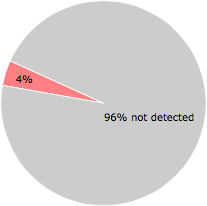
2 of the 57 anti-virus programs at VirusTotal detected the remindersserver.exe file. That's a 4% detection rate.
| Scanner | Detection Name |
|---|---|
| Tencent | Trojan.Win32.YY.Gen.2 |
| TrendMicro-HouseCall | Suspicious_GEN.F47V0430 |
remindersserver.exe removal instructions
The instructions below shows how to remove remindersserver.exe with help from the FreeFixer removal tool. Basically, you install FreeFixer, scan your computer, check the remindersserver.exe file for removal, restart your computer and scan it again to verify that remindersserver.exe has been successfully removed. Here are the removal instructions in more detail:
- Download and install FreeFixer: http://www.freefixer.com/download.html
- Start FreeFixer and press the Start Scan button. The scan will finish in approximately five minutes.
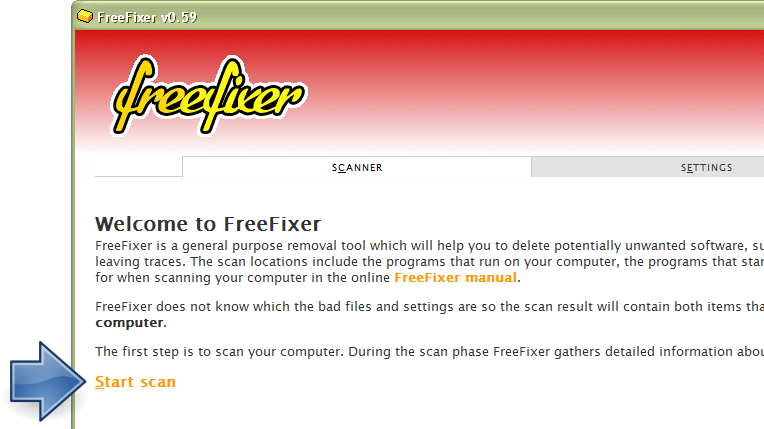
- When the scan is finished, locate remindersserver.exe in the scan result and tick the checkbox next to the remindersserver.exe file. Do not check any other file for removal unless you are 100% sure you want to delete it. Tip: Press CTRL-F to open up FreeFixer's search dialog to quickly locate remindersserver.exe in the scan result.



 C:\Program Files\WindowsApps\M..1.4.4.120_x86__8wekyb3d8bbwe\remindersserver.exe
- Scroll down to the bottom of the scan result and press the Fix button. FreeFixer will now delete the remindersserver.exe file.

- Restart your computer.
- Start FreeFixer and scan your computer again. If remindersserver.exe still remains in the scan result, proceed with the next step. If remindersserver.exe is gone from the scan result you're done.
- If remindersserver.exe still remains in the scan result, check its checkbox again in the scan result and click Fix.
- Restart your computer.
- Start FreeFixer and scan your computer again. Verify that remindersserver.exe no longer appear in the scan result.
Hashes [?]
| Property | Value |
|---|---|
| MD5 | 4eeadcbe63b14a592114112480b04458 |
| SHA256 | b0d09a7b48d4e6c39c871f4cbf0951793535cf102283691f60bacd3b1279c7f2 |
Error Messages
These are some of the error messages that can appear related to remindersserver.exe:
remindersserver.exe has encountered a problem and needs to close. We are sorry for the inconvenience.
remindersserver.exe - Application Error. The instruction at "0xXXXXXXXX" referenced memory at "0xXXXXXXXX". The memory could not be "read/written". Click on OK to terminate the program.
Reminders WinRT OOP Server has stopped working.
End Program - remindersserver.exe. This program is not responding.
remindersserver.exe is not a valid Win32 application.
remindersserver.exe - Application Error. The application failed to initialize properly (0xXXXXXXXX). Click OK to terminate the application.
What will you do with the file?
To help other users, please let us know what you will do with the file:
What did other users do?
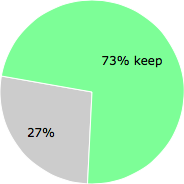
The poll result listed below shows what users chose to do with the file. 27% have voted for removal. Based on votes from 37 users.
NOTE: Please do not use this poll as the only source of input to determine what you will do with the file.
Comments
Please share with the other users what you think about this file. What does this file do? Is it legitimate or something that your computer is better without? Do you know how it was installed on your system? Did you install it yourself or did it come bundled with some other software? Is it running smoothly or do you get some error message? Any information that will help to document this file is welcome. Thank you for your contributions.
I'm reading all new comments so don't hesitate to post a question about the file. If I don't have the answer perhaps another user can help you.
All these files are from the 1st 1/2 of Winds10 install. if you got the early Developer tools in July from microsoft.
~~In Local C: > Windows > SystemApps > Microsoft.Cortana
~~All apart of Apache / Azure / Python
~~You can go into Admin Settings & Disable ALL "Apache"!!! Without any harm!!
Apache is not in Programs & Features so we can remove. Disable & if you are being your own server with cloud & adobe,, Dont use apache!
Windows10 in my book....Was a Huge Mistake adding as an average user,,
*CPU runs alot higher!
*Alot of our Admin & Services control is gone,,
*I Hate Cortana!
Just My Thought's.. Thankx Hope this helps some of ya'll!
~Happy Comper Geakín! :) Mz.j
# 2 Dec 2015, 2:13
jacci writes
I had made 13 scrn shots for this reply,,but adding them is not an option here..
*To this site Admin..
Feel free to rech me if i am wrong in any of this, i have been running my sys this way since end of July. I hate to give improper directions to anyone fixing there own computers!!
~~P.S. YA'LL!!!! ALWAYZ RESEARCH 2-4 DIFF SITES/TECH SERVICES BEFORE YOU LISTEN TO ANYONE IN SELF COMP. SYS CHANGES! ( coming from me~comp / tech-ish geek 13 years! )
# 2 Dec 2015, 2:22
Charlie Wallace writes
What kind of bullshitAre you pushing I was simply looking for a program. To remove that Windows junk. But instead you end up having me install some type of company management software.Just another ass hole wasting people's time
# 24 Apr 2016, 12:13
Robbie K writes
First I ran "Dependency Walker
to see if there are any files/programs depending on this file from Cortana.
since Cortana is not running in New Zealand it's making this file obsolete I think as many of the dependency files are missing from my computer.. basically it says this in the final summary...
...
Error: At least one required implicit or forwarded dependency was not found.
Error: At least one module has an unresolved import due to a missing export function in an implicitly dependent module.
Error: Modules with different CPU types were found.
Warning: At least one delay-load dependency module was not found.
...
I haven't removed it yet but it's worth noting Cortana is not operating in new Zealand and this Execution file "reminder server" may be sucking up resources for no apparent reason.
I'll next have a look what the "should I remove it" program has to say about it. Well its not listed and neither is Cortana. I'm guessing if I had Cortana then I'd somehow need this program reminder-server, but at present it's just wasting space.
So what now?
...
This reminds me (reminderserver) of the old Execution program loadqm which MSN put out on win98 we solved that program not by deleting it but renaming is to (Dontloadqm) so it wouldn't A. reinstall it's self and B. check on the internet every 3 seconds for a MSN chat updated program.
in the days of dial-up modems that was disastrous and stopped all internet services from operating almost completely.
just remember if something isn't working as it should then there's probably something else interfering in the process.
# 31 Jul 2016, 5:35
jacci writes