What is vxlsnyaiet64.exe?
vxlsnyaiet64.exe is usually located in the 'C:\Program Files\003\' folder.
Some of the anti-virus scanners at VirusTotal detected vxlsnyaiet64.exe.
If you have additional information about the file, please share it with the FreeFixer users by posting a comment at the bottom of this page.
Digital signatures [?]
vxlsnyaiet64.exe is not signed.
VirusTotal report
1 of the 51 anti-virus programs at VirusTotal detected the vxlsnyaiet64.exe file. That's a 2% detection rate.
| Scanner | Detection Name |
|---|---|
| Antiy-AVL | Trojan/Win32.SGeneric |

Filename variants
vxlsnyaiet64.exe may also use other filenames. The most common variants are listed below:
- yewimmxqbs64.exe
- buuoujqmrk64.exe
- nuttkoqiez64.exe
- xmkysecqun64.exe
- pfzhbwvvvj64.exe
- bukgmhvrux64.exe
- zyyequkheo64.exe
- fpvoixdaog64.exe
- oztyipjuek64.exe
- jzmoeejfme64.exe
- nuttkoqiez6.exe
Folder name variants
vxlsnyaiet64.exe may also be located in other folders than C:\Program Files\003\. The most common variants are listed below:
- C:\Program Files\002\
Hashes [?]
| Property | Value |
|---|---|
| MD5 | 69ca9a1113f95f9c08c9031ab4418fbf |
| SHA256 | e665c7e4e66c4ae1e6e19c548ce0b2fced30cc81e205ea8911bd196cade4ee7b |
Error Messages
These are some of the error messages that can appear related to vxlsnyaiet64.exe:
vxlsnyaiet64.exe has encountered a problem and needs to close. We are sorry for the inconvenience.
vxlsnyaiet64.exe - Application Error. The instruction at "0xXXXXXXXX" referenced memory at "0xXXXXXXXX". The memory could not be "read/written". Click on OK to terminate the program.
vxlsnyaiet64.exe has stopped working.
End Program - vxlsnyaiet64.exe. This program is not responding.
vxlsnyaiet64.exe is not a valid Win32 application.
vxlsnyaiet64.exe - Application Error. The application failed to initialize properly (0xXXXXXXXX). Click OK to terminate the application.
What will you do with the file?
To help other users, please let us know what you will do with the file:
What did other users do?
The poll result listed below shows what users chose to do with the file. 96% have voted for removal. Based on votes from 223 users.
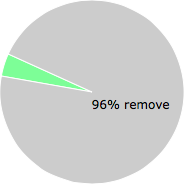
NOTE: Please do not use this poll as the only source of input to determine what you will do with the file.
Malware or legitimate?
If you feel that you need more information to determine if your should keep this file or remove it, please read this guide.
And now some shameless self promotion ;)
 Hi, my name is Roger Karlsson. I've been running this website since 2006. I want to let you know about the FreeFixer program. FreeFixer is a freeware tool that analyzes your system and let you manually identify unwanted programs. Once you've identified some malware files, FreeFixer is pretty good at removing them. You can download FreeFixer here. It runs on Windows 2000/XP/2003/2008/2016/2019/Vista/7/8/8.1/10. Supports both 32- and 64-bit Windows.
If you have questions, feedback on FreeFixer or the freefixer.com website, need help analyzing FreeFixer's scan result or just want to say hello, please contact me. You can find my email address at the contact page.
Comments
Please share with the other users what you think about this file. What does this file do? Is it legitimate or something that your computer is better without? Do you know how it was installed on your system? Did you install it yourself or did it come bundled with some other software? Is it running smoothly or do you get some error message? Any information that will help to document this file is welcome. Thank you for your contributions.
I'm reading all new comments so don't hesitate to post a question about the file. If I don't have the answer perhaps another user can help you.
This file is BAD BAD BAD! It was installed along with a ton of crap when I went to www.winrar.com instead of www.win-rar.com. I'm pretty careful, so I killed the installer early on, but some of the stuff installed. The uninstallers were wonky and grayed out too. Luckily I toasted it before I restarted and went through all of my browser settings.
# 22 Apr 2014, 7:23
Charlie writes
This is spyware. For manual removal instructions (not required to install any software), see this post: http://geekvisit.com/remove-double-underlined-adware-rrfilter/
Worked great for me.
# 23 Apr 2014, 23:43
James Petherick writes
I think this turned up on my comp after searching the web for Keygens Bad i know but every penny counts now a day, Got my software for free but got infected with some useless crap on the way, most was deleted/removed just by uninstalling a subsequent scan found this thing sitting in file 003.
I am using free software provided by my virgin media count "F-secure safe" its seems ok so far.
# 26 Apr 2014, 11:40
Moi writes
I came across this file while struggling with Browser Guardian on my wife's brand new laptop last night which i just pulled out of a properly taped packaging box that i bought from Best buy. How did it get there in the first place, i have no idea, since it was already there as soon as i started it up for the first time myself.. I think somebody bought it and used it and didnt intend to keep it and fooled Best buy when returned as "unopened box". I would go with reovery/restore but i cannot trust its content not to courrupt as well so i have to delete that recovery partition and dish out another 30 bucks to get the install discs from Toshiba. But for now; I have disabled it, stopped the process, and deleted the folder containing that specific file and dealt with Browser guardian by removing pcreg in the same manner mentioned. I had issue with Conduit in the past, a very very active adware that is constantly changing how it injects itself into the system to try to hide from manual detection. my mother clicks on every link she sees, basically so that really messed up her computer badly, adware injected everywhere on her pc i had to reformat it and establish strict admin policies on the pc so that my mom cant mess it up again. I have done some research and this file belongs to one discovered method by Conduit. Conduit needs to GO DOWN!!!! once more. Conduit needs to GO DOWN!!!!!!!!
# 2 Jun 2014, 16:54
Moi writes
Yes it was last modified 2 months prior to purchase. I had spoken to them but they won't budge. Claiming it is brand new and up opened. I call bull. O well typical best buy customer service. I formatted the hard drive and decided to downgrade from win8 to win7 for my wife. So its all good on my end though missing some drivers that toshiba never bothered to develop for win7 version so right now im unable to use built in usb3.o or lan. In chip set driver available. Not even thru AMD. Which it is AMD a6 5200 apu. Wifi working though. Got my own win7 disc
# 7 Jun 2014, 13:15
Bill Dickinson writes
The file I have found is...
vxlsnyaie64.EXE
NOTE THE ABSENCE OF "...t64.EXE"
I have not yet removed it.
Your thoughts please.
# 13 Jul 2014, 21:47
Cisco writes